Spotlight › Word
Microsoft Word, on an 8086
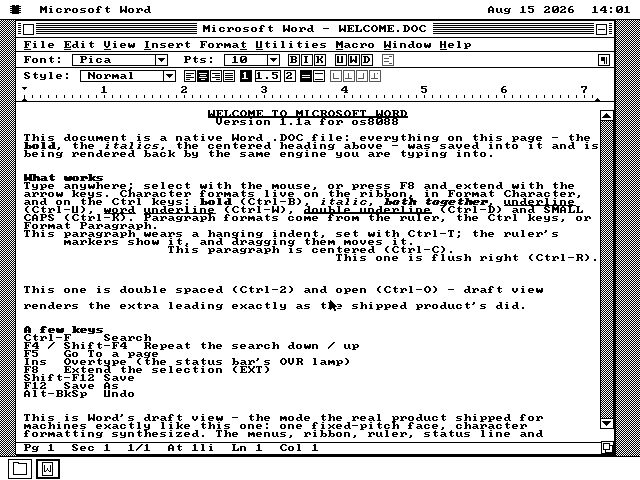
This is the latest slightly improbable addition to os8088: my own version of Microsoft Word 1.1a. It looks like 1990, saves Word .DOC files, and runs on a 4.77 MHz PC.
- the program
- 47,212 bytes
- saves
- Word .DOC files
- machine
- 4.77 MHz 8088
The story behind it
I wanted to see how much of 1990 Word I could make comfortable on a tiny old PC.
A familiar face from 1990
Word for Windows 1.1a came out in 1990, when Windows was still a fairly new sight on an office PC. It is recognisably Word, but small enough that you can still get your head around the whole thing.
Why I could not just copy it over
The original program needs Windows, and os8088 is a completely different operating system. There is nowhere for a Windows program to run here. So I wrote a new os8088 program, in assembly, that behaves like Word 1.1a.
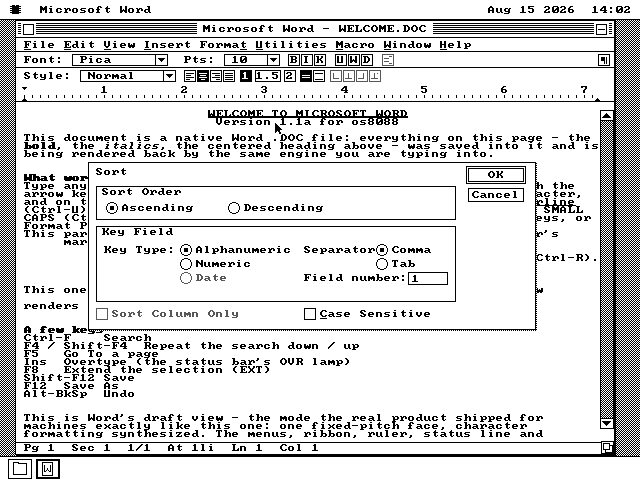
I did not recreate it from hazy memories and screenshots. Microsoft shared the original source with the Computer History Museum in 2014, so I could use the real menus, dialogs and keyboard shortcuts as my guide. Even the wonderfully old-fashioned wording in the Sort box comes straight from the 1990 program.
The important distinction: this is my own program, made to look and behave like Word 1.1a and to read its files. It is not Microsoft's code recompiled, and it is not connected to Microsoft.
See it running
Here are a few of my favourite bits.
How it fits on a machine this small
One tiny font and a handful of very 1990 tricks go a surprisingly long way.
Eight dots by eight dots
os8088 has one font, in one size. Every letter has to fit into a little eight-by-eight square, which does not leave much room for a word processor to show off.
Luckily, Word 1.1a already knew how to live with screens like this. Plenty of PCs in 1990 had the same limitation.
Clever little cheats
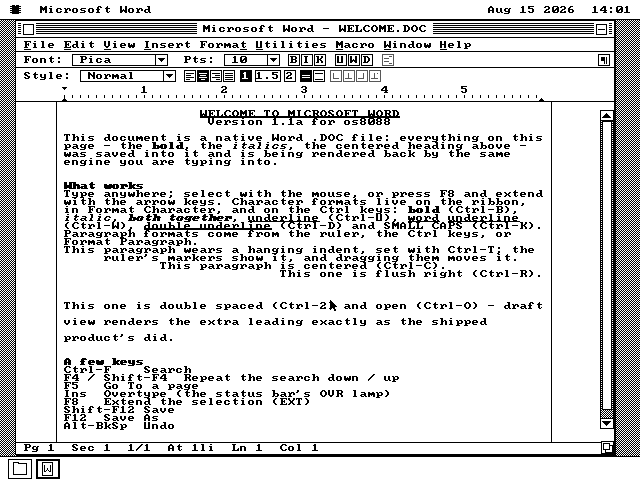
In Draft view, bold is just each letter drawn twice, one dot apart. Italics lean the same letters over, and underlining rules a line beneath them. It is simple, fast, and surprisingly convincing.
Best of all, these are the same tricks the original Word used on a plain screen.
The ruler works, too
The top row has the formatting buttons and the bottom row is a ruler marked in inches. It begins and ends with the text on the page, just like you would expect.
Drag an indent marker and the paragraph follows along. That small detail is especially satisfying on a 4.77 MHz machine.
Write first, check the page later
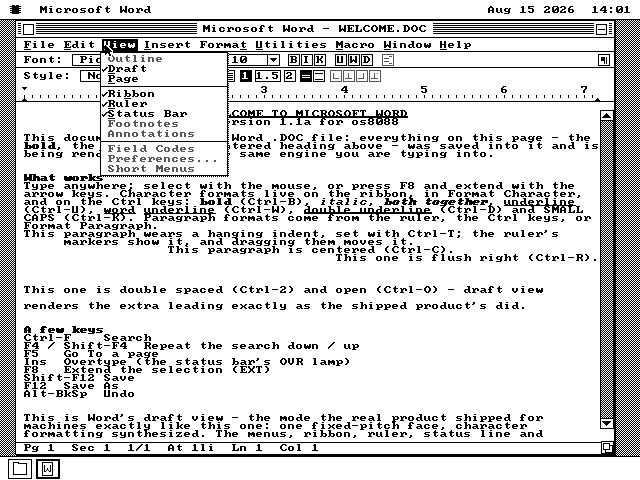
Draft view uses the whole window, which is handy while you are writing. Page view lays everything out on the sheet, so you can see where each line will land.
A mark in the margin shows each page break. You can hop between the two views from the View menu.
The .DOC files are not just for show
I wanted the documents to be useful outside this little corner of 1990.
Making up a simple file format would have been much easier, but it would also have spoiled the fun. This version saves documents the way Word for Windows did, including the formatting and paragraph layout. It can also read and write RTF, which plenty of newer word processors still understand.
I checked this more than once
I was nervous enough about the file format that I wrote two separate tools to check it -- one writes a document and the other reads it back. They were built separately from Word, so when all three agree byte for byte it is a useful check. It has already caught four mistakes that looked perfectly fine on the screen.
One thing I have not tried yet: opening one of these files in an actual copy of Microsoft Word 1.1a. The format matches two separate readings of Microsoft's original description, but the old program itself is the test that really counts. If you give it a go, I would love to hear what happens.
What works, and what does not
There is enough here to write with, but it is not every last corner of Word 1.1a.
You will notice plenty of grey menu items: 57 out of 85, if you count them. They mostly fall into three groups:
- Some are missing their supporting files. The dictionaries were not part of the source Microsoft shared, so spelling and the thesaurus have nothing to look words up in.
- Some need things os8088 cannot do yet. Printing is the obvious one. No os8088 program can print right now, so Word cannot either.
- Some are features I have not built. Tables, footnotes, headers and footers are the big ones.
Print Preview is grey as well. I could make the preview appear, but with no way to print the page it felt more honest to leave both commands switched off.
Two more things to know before writing your memoirs: Page view marks the end of each sheet in the margin instead of drawing a gap between pages. And if you open a document with headers, footers or footnotes, this version will neither show nor preserve them when you save.
Try it yourself
Word has a floppy of its own, as any 1990 word processor should.
-
Grab the Word disk. It is in every release --
word.imgfor a 1.44MB drive, orword360.imgfor the 360KB 5.25-inch kind used by older machines. If you are building from source instead, this makes all three sizes:make worddisk -
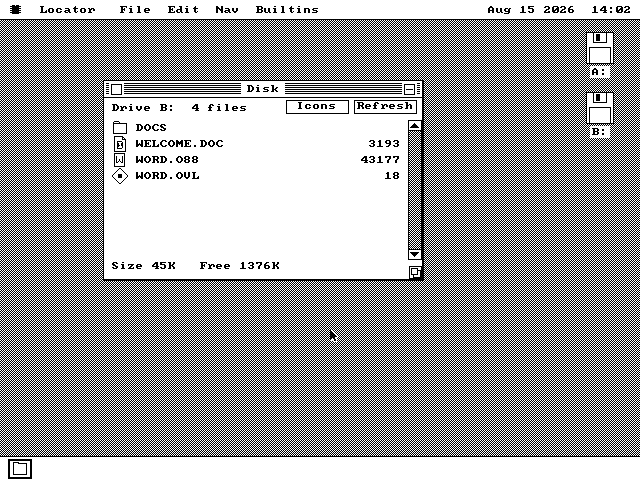
Put the Word disk in the second floppy drive, in place of the usual software disk, and start os8088. The included IBM XT and 386 setups do this for you --
make xt-wordandmake 386-word. -
Double-click the B: disk icon on the desktop to see what is on it.
-
Double-click
WELCOME.DOC. Word starts by itself and the document opens with all its formatting, just like the picture at the top of this page. Save your own masterpiece in the DOCS folder with File › Save As.
Why a separate floppy? Word takes 47,212 bytes. That is tiny now, but on a 360KB disk it would crowd out a good chunk of the other software.