Spotlight › CP/M
CP/M, in a window
CP/M was the operating system small computers ran before the IBM PC existed. os8088 now emulates the processor it ran on, so its software runs here -- in a window, beside Minesweeper.
- emulates
- a Zilog Z80
- written in
- 4,679 lines of C
- machine
- 4.77 MHz 8088
What CP/M was, and why this is strange
An operating system older than the machine emulating it.
The standard before the standard
CP/M was written in 1974 by Gary Kildall, who went on to sell it through the company he founded, Digital Research. Through the rest of that decade it was what a serious small computer ran. Hardware makers built wildly different machines -- Kaypro, Osborne, Altair, hundreds of others -- and CP/M was the layer that let one program run on all of them. WordStar and dBase were CP/M programs before they were anything else.
It ran on 8-bit processors: the Intel 8080 and, far more often, the Zilog Z80. Those chips
address 64KB of memory and nothing beyond it, so CP/M is small in a way that is hard to picture
now. The part that stays in memory while your program runs is a few kilobytes. The command
processor -- the thing that prints A> and reads what you type -- is 2,048 bytes.
The strange part
The IBM PC arrived in 1981 with PC-DOS, which was closely modelled on CP/M: the same drive letters, the same eight-character names with three-character extensions, many of the same calls in the same order. The PC is the machine that ended CP/M.
So this is an IBM PC, running an operating system written in assembly for it, emulating the processor of the machines the PC replaced, to run the operating system that PC-DOS was copied from. On a 4.77 MHz 8088, one instruction at a time.
This is a port, not a rewrite from memory. The behaviour comes from RunCPM by Marcelo Dantas, a CP/M emulator that runs on modern computers and on microcontrollers, under the MIT licence. None of its code is in the os8088 repository: the behaviour was read out of its source and written again in the C this system compiles. The build fetches its command processor and its disk of software when you ask for them.
See it running
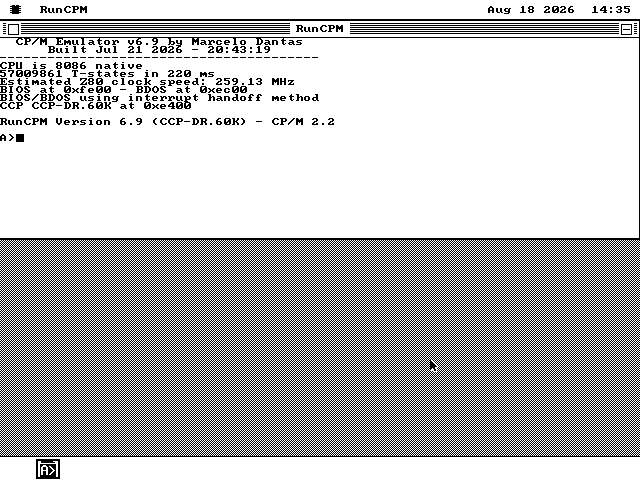
Every picture here came out of the emulator, on the disk you can download.
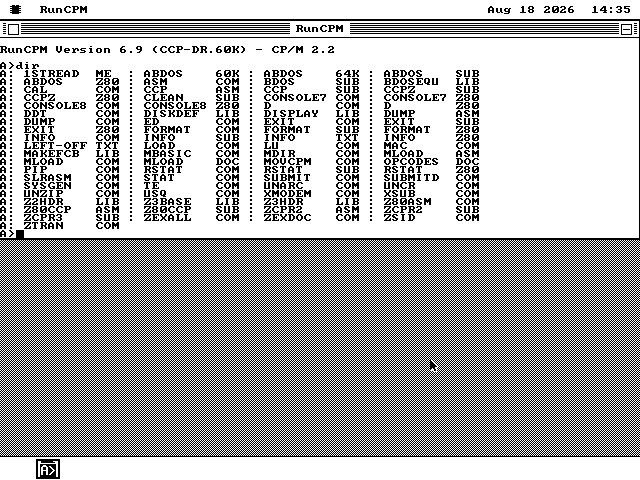
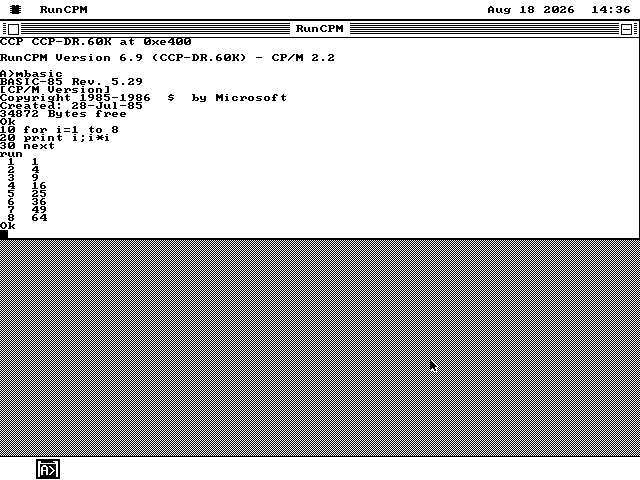
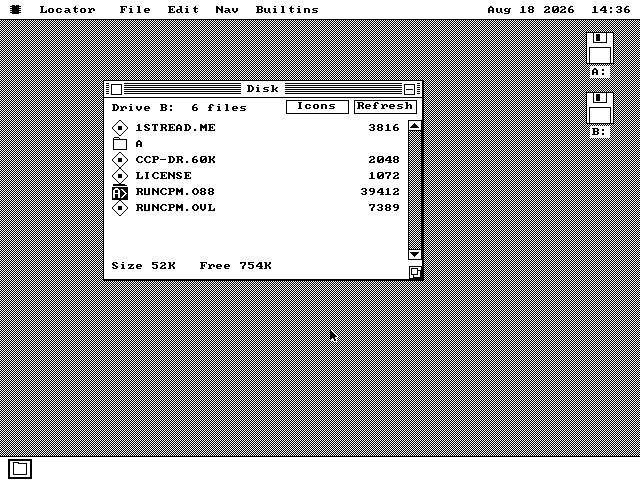
A, which is the folder that is CP/M's drive A.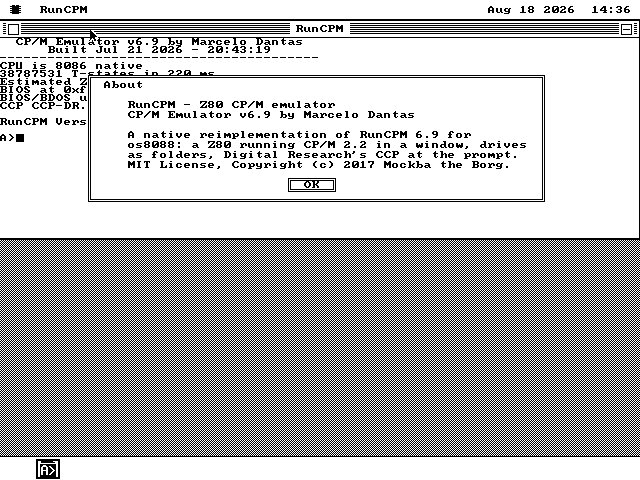
How you emulate a Z80 on an 8086
The hard part is not the instructions. It is not freezing the rest of the system.
The processor
Emulating a processor means reading one of its instructions, working out what it does, doing that, and moving on -- millions of times. It is the innermost loop of the whole program, so it is the one part of this that is not written in C: it is 1,870 lines of hand-written 8086 assembly, which keeps the Z80's registers in the 8086's own registers rather than in memory.
The Z80's 64KB of memory is a separate block that os8088 hands out on request. It is not part of the program -- a program here gets 60KB in total, so the emulated machine would not fit inside one even if nothing else did.
How it is checked
There is a standard test for this, and it is older than most of the people who use it: ZEXDOC, a CP/M program that runs every documented Z80 instruction over thousands of combinations of inputs and flags, and compares a checksum of the results against what real hardware produced. It reports 67 groups of tests. All 67 pass -- both inside os8088 and in a separate harness that runs the same code with nothing else around it.
Sharing the machine
An emulator wants to run flat out forever. The rest of the system needs the processor back to move the mouse, drop a menu and redraw a window. So the emulator runs in slices: it executes for a while, hands control back, and asks to be woken up again. When the CP/M program is waiting for you to type something it stops asking, and costs nothing at all until a key arrives.
That mechanism did not exist before this program needed it, and it is now part of the system any program can use.
Drawing the terminal
An 80-column by 25-row terminal is 2,000 characters, and drawing 2,000 characters on a 4.77 MHz machine takes about two seconds. So the terminal is never redrawn. The program keeps a copy of what is on screen and puts down only what differs: echoing one character you typed is one drawing operation covering two character cells, and the opening banner -- eight lines on an otherwise blank screen -- costs nine operations rather than 2,000 characters' worth.
Drives are folders, so you can put files in
CP/M's disks are ordinary folders on an ordinary floppy.
CP/M has drives A to P, and each drive has sixteen numbered user areas. Here each one is a
folder: drive A user 0 is a folder called A with a folder called 0
inside it. There is no disk image and no container format.
The floppy itself is a standard FAT12 volume, the kind DOS has used since 1981, so macOS,
Windows and Linux all mount it. Copy a .COM file into A\0 from your own
computer and it is on drive A the next time you start CP/M. Copy something back out and it is a
file on your desktop. That is the whole of the arrangement.
None of the CP/M software is in the os8088 repository. A script fetches RunCPM's command processor and its master disk when you build the floppy, at a fixed version, so the same build always produces the same disk.
What it does not do
Each of these is a decision with a reason, and the program says so where you would meet it.
One typeface, no colour
The terminal understands the cursor movements and the screen-clearing codes CP/M software sends, and reverse video. Bold, underline and colour arrive and are ignored, because the screen this system draws on is black and white with one 8-pixel typeface.
64KB a file, eight at a time
A file is capped at 65,535 bytes and eight can be open at once. Both come from the same place: this is 16-bit code with no 32-bit arithmetic in it, so a size is one number that stops there. Three files on the master disk are bigger than that and are left off, with a text file on the disk naming them.
No slowing it down
Real CP/M machines ran at 2 to 4 MHz, and some software assumes it. RunCPM can throttle itself to match; this port cannot, because it never sleeps -- it hands the processor back instead. The banner prints the speed the machine actually delivered rather than a figure anyone assumed.
CP/M 3, banked memory, XMODEM
This is CP/M 2.2 and nothing later. There is no banked memory, no file transfer over a serial line, and no debugger. The parts of the original that talk to Arduino pins are not here for the obvious reason.
Try it yourself
In your browser in about thirty seconds, or on a floppy of its own.
-
The quickest way is the browser demo. It boots os8088 with the every-application floppy in the second drive, and CP/M is on it. Double-click the
Disk Bicon, then theRUNCPMfolder, thenRUNCPM.O88. -
Or take the disk.
runcpm.imgin every release is a 1.44MB floppy with the emulator and the whole master disk on it;runcpm360.imgis the 360KB version, with drive A trimmed to what fits. Either goes in the second drive in place of the software disk. Building from source,make runcpmdiskmakes all three sizes. -
Type at the prompt.
DIRlists the disk.MBASICstarts Microsoft BASIC, andSYSTEMleaves it again.TEis a full-screen text editor.ZEXDOCruns the processor test described above, and takes a while. -
Press Alt-F for the whole screen. A window with a title bar on it shows 79 of the 80 columns. Alt-F drops the frame and gives the terminal the entire screen; Alt-F again puts it back.
It is a window like any other. You can drag it, put another program in front of it, and go back to it. The CP/M program inside carries on running while you do.