Spotlight › Apple II Plus
An Apple II Plus in an 8086 window
A 48K Apple II Plus, running inside a window on an Intel 8086 -- Applesoft BASIC at its prompt, the real Apple ROMs underneath, and a status line that tells you exactly how slowly it is going.
- guest
- Apple II Plus, 48K
- screen
- 280 x 192, seven-pixel cells
- speed on an XT
- 0.54% of a real Apple
On a 4.77 MHz PC/XT this is a machine to look at rather than to use. A 386 runs it usefully, and the program is listed as wanting a 486.
![An os8088 window titled Apple II Plus Emulator showing a black Apple screen with APPLE ][ at the top and a flashing cursor at the prompt. A status strip along the bottom of the window reads TEXT on the left and 2690 per cent on the right.](/img/apple2/apple2-ready.png)
Meet the Apple II Plus
The machine that was ready to program the moment you switched it on.
Apple sold the II Plus from 1979. Inside was a 6502 processor running at 1.02 MHz and 48 kilobytes of memory. What made it what it was is that BASIC came in the machine: switch it on and a right square bracket is waiting for a program. No disk, no loading, no manual first.
Its screen had four faces. Forty columns by twenty-four rows of text. A low-resolution mode of coloured blocks. A high-resolution mode of 280 by 192. And a mixed mode that put four rows of text under a picture, which is how most games showed you your score.
The sound was one bit. A program flipped it and the speaker clicked; everything an Apple II ever played was made out of the timing between those clicks. Software came on floppy disks, or you typed it in from a magazine.
What is in the window
A whole machine, minus its floppy drive -- and the parts that are missing say so.
The 6502 is emulated in 64 kilobytes claimed from the operating system, 48 of them usable, exactly as the real machine had. Applesoft BASIC, the start-up monitor and the character shapes are the real Apple ROM images, and they are carried inside the program file itself rather than as separate files beside it, so they cannot be lost or mismatched.
All four screen modes draw, including inverse and flashing text and the second display page. The keyboard is the II Plus's own. The speaker plays what a program toggles.
The window is monochrome, which is what an Apple II on a composite monitor looked like. Machine then Color NTSC takes the whole screen instead and puts the colours back. That needs a VGA card; on the two black-and-white cards the menu item is greyed and says which measurement ruled it out.
There is no Disk II in this build, so there are no disk images to open. A program gets in one of three ways: File then Load Program reads a BASIC program off an os8088 disk, Edit then Paste types a listing in, or you double-click a .BAS file. WELCOME.BAS ships beside the emulator to open that way.
Menu items the port does not implement are shown and greyed with the fact that greys them, rather than quietly removed. The Joystick item says the paddles answer centre. The 3.5 MHz item says there is no such mode here. You can see the shape of what is missing.
See it running
A BASIC program, a graphics screen, and where every piece came from.
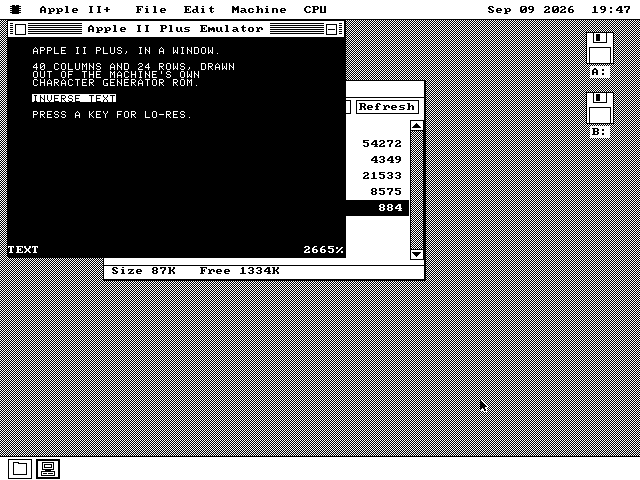
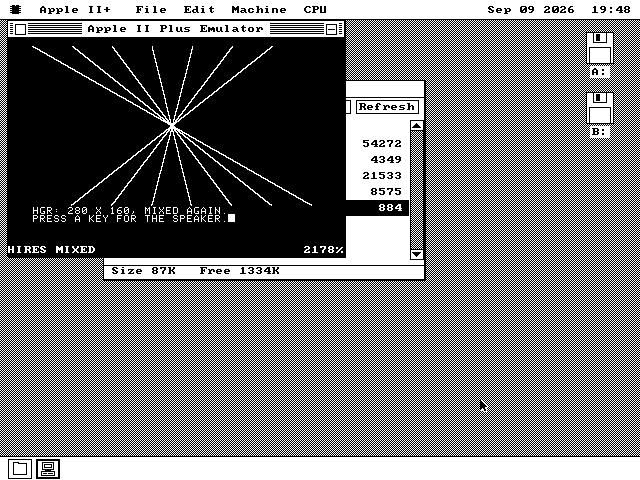
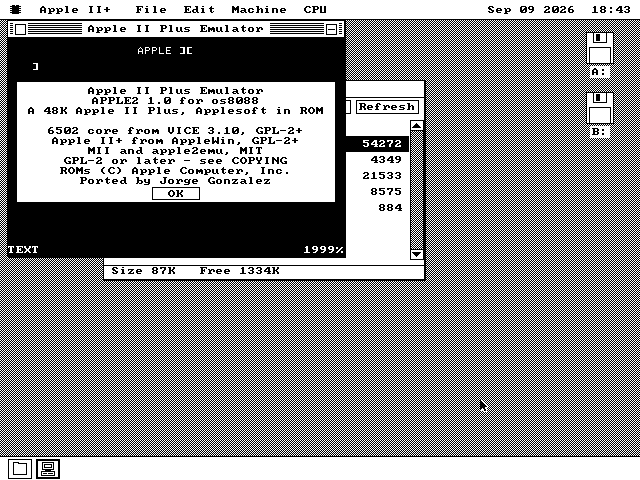
Seven pixels to the character
The one number that decided how the whole screen is drawn.
Divide the Apple's 280-pixel width by its 40 columns and you get seven. A PC draws text eight pixels wide, and eight pixels is exactly one byte of screen memory, so a character can be dropped in as whole bytes with no arithmetic at all.
Seven cannot. After the first character on a row, no character starts on a byte boundary, so every one has to be shifted into place and split across two bytes. There is no per-character shortcut anywhere on this machine, and there was no code in the project to copy: the Commodore 64 emulator it borrows its processor from composes eight-pixel cells.
So each row of the Apple's screen is built into a strip of memory of its own, shifting as it goes, and the finished strip is sent to the screen in one operation. Text, low resolution and high resolution all use the same kind of routine, which is why the third one was cheap once the first existed.
Only the parts of the screen that changed are rebuilt. That matters more here than it looks: on the slowest machine this runs on, half of every second goes on redrawing.
How fast it really is
The number is on the glass, every second, and it is not flattering.
Measured on a cycle-accurate recreation of a 4.77 MHz IBM PC/XT, the emulated Apple runs at 0.54 per cent of a real Apple's speed sitting at the prompt, and 0.64 per cent while a BASIC loop runs. The status line prints whole per cent, so on that machine it reads 0%.
Of every second there, 39 per cent goes on the 6502 itself and 50 per cent on redrawing the screen. That is the ceiling: making the processor faster cannot buy back what the picture costs.
What an XT does give you is a machine that answers. The prompt takes a keystroke, a short program runs, and the desktop's menus still come down while it does. It is a machine to look at. A 386 runs it usefully.
The status row prints the figure every second rather than leaving the page to make a claim about it. Under the emulator that runs these screenshots -- a modern PC pretending to be an 8086 -- it reads several thousand per cent, which is just as true and just as unflattering to the page.
Running it yourself
One floppy image, one double-click, and a BASIC prompt.
-
Take apple2.img from the release, or the everything disks (apps-all-1.img and on), which carry every program between them. The emulator, its second file, a README, the licence and WELCOME.BAS live in one folder together and have to stay that way.
-
Boot os8088 with that disk in the second drive, double-click Disk B, open the APPLE2 folder and double-click APPLE2.O88. The prompt appears after a moment.
-
Type a program in, or double-click WELCOME.BAS to start with one already loaded, and type RUN. Alt+Enter gives the emulator the whole screen and takes it back again.
-
A 386 or better is what to run it on. An XT will do everything an XT can, slowly, and tell you the truth about it while it does.