Spotlight › Browser
A web browser for the IBM PC XT
os8088 fetches real web pages and lays them out as text and tables. It has run on a 1981 IBM PC whose newest part is a mouse from 1985.
- the browser
- 13,889 bytes
- the network stack
- ARP to TCP
- the processor
- 8088 at 4.77 MHz
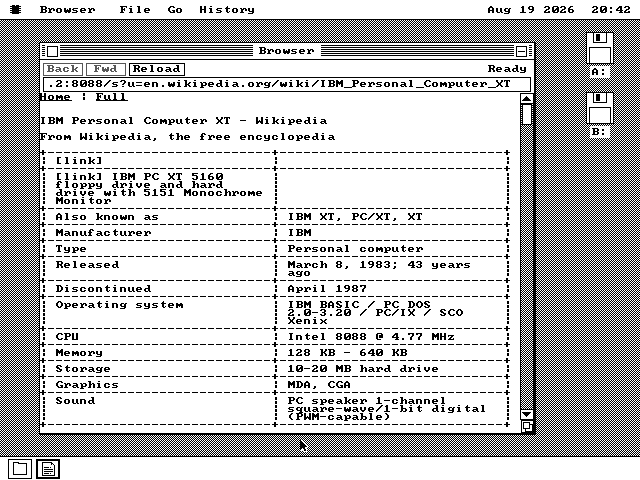
CPU — Intel 8088 @ 4.77 MHz describes the
machine drawing it.What it is
A browser small enough to run in a computer that predates the web by ten years.
A page, on a machine from 1981
You type an address, and the browser opens a connection, asks for the page, reads the reply and draws it. It follows links, keeps a history, and goes back and forward. That is a browser, and none of it is unusual — except that it is happening on a processor that runs about a thousand times slower than the one you are reading this on, with less memory than a single photograph.
It reads HTML, and it means it
The page is not pre-chewed into plain text somewhere else. The browser parses the HTML itself: headings, paragraphs, lists, links, horizontal rules, form fields and tables. Tables do the most work. It measures every cell, works out how wide each column has to be, wraps the text inside them, and draws the borders, so an infobox arrives as an infobox.
The whole thing is 13,889 bytes
That is the program on the disk, written in assembly, and it does not include the network code. Fetching lives in a separate driver: the browser asks for bytes without knowing whether a card or a cable is bringing them.
See it running
Every picture here is a screenshot of the real thing, taken from a booted machine.
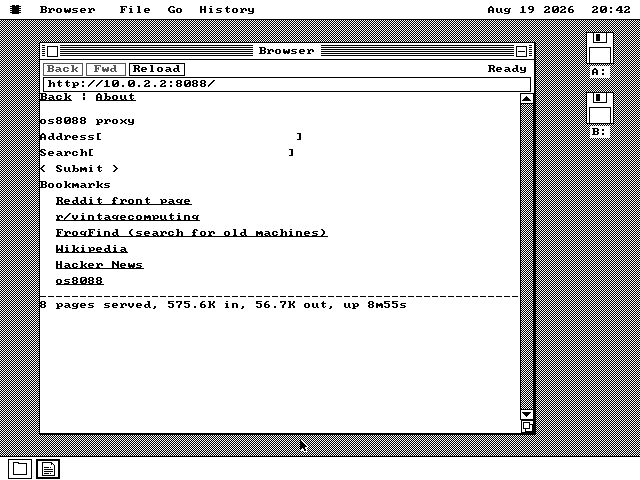
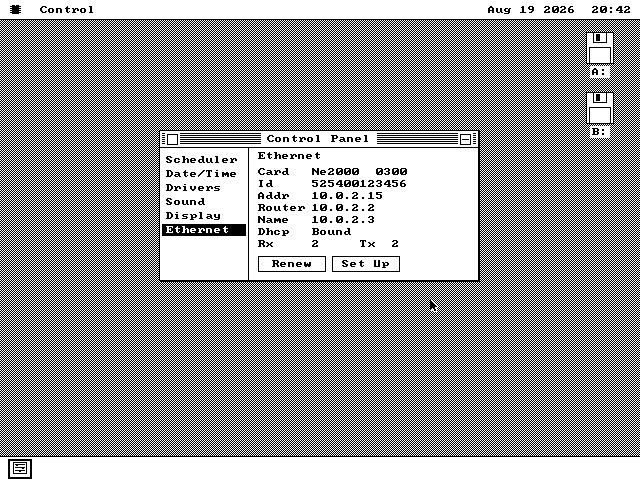
Bound means a
server answered.Getting on the wire
Two ways in, and the programs above cannot tell them apart.
NE1000 and NE2000
These were the cheap, common network cards of the late 1980s, and they turn up in junk boxes and on auction sites to this day. os8088 drives one directly and speaks the protocols above it: ARP to find the router, IP to address a packet, UDP, and TCP to hold a conversation.
It also speaks DHCP, so the machine asks the network for an address when it starts rather than being told one. You can set an address by hand instead if you would rather.
The printer port, if there is no card
The other way is a cable from the printer port to a DOS machine standing next to it, which forwards traffic on os8088's behalf. It is slow — 3,741 bytes a second, measured — but it needs no card at all, and plenty of period machines have a printer port and an empty slot.
A machine with both tries the card first.
The browser does not know which
Both routes answer the same handful of requests: open a connection, send this, read what came back, close. The browser gained a network card without a line of its fetching, parsing or drawing changing.
The Telnet program that ships alongside it works over the same calls.
Why drawing is the hard part
The surprise of the whole project: the network was never the bottleneck.
Putting one character on this screen costs about 900 millionths of a second. That sounds like nothing until you count them: a full window of text is roughly 2,700 characters, which works out at between 1.2 and 2.6 seconds to draw, depending on the display card. A page that arrives over a fast card in well under a second then takes several seconds to appear.
So the browser never draws a character twice and never draws a line that did not change. Scrolling slides the pixels that are already there and letters only the rows uncovered at the edge. Holding an arrow key down does not queue one redraw per keypress: the browser sees the keys still arriving, adds up how far it is being asked to move, and draws once at the end.
Without that, holding an arrow key puts the machine further behind with every keystroke. That failure never shows up on a fast emulator.
The HTTPS problem
Nearly every site is encrypted, and this machine cannot do the arithmetic.
Opening an encrypted connection means one very large multiplication. On a 4.77 MHz 8088
it takes minutes. The browser refuses https:// addresses by name.
A small program on another computer on your network does that part: it makes the encrypted connection, fetches the page, and hands os8088 an ordinary unencrypted copy. It also strips the page down on the way through. pypi.org goes from 21.8KB of markup to 705 bytes of text — over the parallel cable, the difference between 55 seconds and 2.
os8088 never holds a password. If a site needs signing in to, the helper program signs in and keeps the session. The browser sends a plain request and has no password field at all.
What it does not do
Stated plainly, because finding out by trying is worse.
- No encrypted connections of its own. Encrypted sites go through the helper program described above, or not at all.
- No images. A picture is shown as a marker where it would have been.
- No JavaScript and no stylesheets. A page that only assembles itself once a script has run will look empty here.
- Text, tables and forms. Headings, paragraphs, lists, links, rules, text fields and buttons are laid out. Anything outside that is reduced to its text.
- A form field holds as many characters as it is wide. Type a long address into a short box and the tail is dropped. Use the location bar for long addresses.
Try it yourself
A card, an address, and a page.
-
Give the machine a network card. On real hardware that is an NE1000 or NE2000 in a spare slot. In QEMU it is two arguments added to the command line:
-netdev user,id=n0 \
-device ne2k_isa,netdev=n0,iobase=0x300,irq=3
86Box and MartyPC have no card this driver can use.
-
Attach the driver. Open the Control Panel, go to Drivers, and attach
ETHER.DRV. The Ethernet page then shows the card it found and the address it was given. -
Start the helper program on another computer on the same network, if you want encrypted sites. It comes with the os8088 source:
python3 tools/os88proxy.py -
Open the browser from the APPS folder, type an address into the bar at the top, and press Enter. A plain
http://site needs nothing else.