Spotlight › BBS terminal
The terminal learns to draw
The terminal used to print what arrived and throw the rest away. It now draws what a bulletin board actually sends -- sixteen colours, the block characters its art is made of, eighty columns by twenty-five rows -- and downloads files off it.
- screen
- 80 x 25, colour per cell
- colours
- 16 foreground, 8 background
- file transfer
- Zmodem, receiving
Files come down, not up. Sending is not implemented.
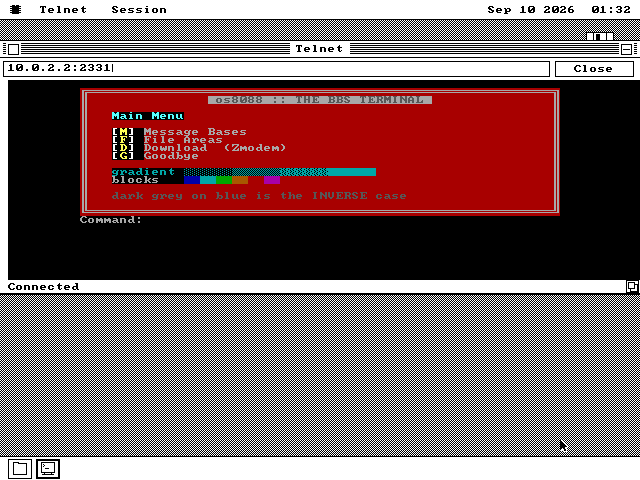
Calling a bulletin board
What was on the other end of the telephone line before the web.
Before the web, you dialled someone else's computer and it answered. That computer ran bulletin-board software: message areas to read and post in, file areas to download from, sometimes a game. One line, one caller at a time, often run by one person out of a spare room.
Boards drew their screens out of text. The IBM PC's character set has 256 characters in it, and about half are not letters: single and double lines, corners, shaded blocks, arrows. Mixed in with them are escape codes -- short invisible sequences that set the colour of what comes next or move the cursor somewhere else on the screen. The convention is called ANSI, and pictures made with it are ANSI art.
A board draws for a screen it knows is eighty characters wide and twenty-five rows tall. That is not a preference. A terminal of any other size does not render a board's art badly so much as render a different picture.
Boards did not all go away. Plenty are still up, reachable over the internet with a Telnet connection instead of a modem, which is exactly what this program makes.
From printing to drawing
What changed, and why eighty by twenty-five is the whole of it.
The old terminal was deliberately dumb. It printed what arrived and recognised the escape codes only so that it could throw them away. That was the honest choice at the time: a code that is discarded shows nothing, while a code that is printed leaves gibberish like [2J in the middle of a sentence and looks like a broken connection.
Now every position on the screen holds a character and its colours -- foreground, background and whether it blinks -- which is how the PC's own text screen has always worked. The whole screen is four thousand bytes, and it is the one thing both ways of drawing it agree about.
There is a real parser now: colours, cursor movement, saving and restoring the cursor, clearing and scrolling parts of the screen. A code it still does not implement is discarded, exactly as before. The characters from 128 to 255 are always drawn and never treated as commands, because a board's art is made of them and a terminal that reads one of them as a command eats the picture.
In a window you see part of the board's screen. Six hundred and forty pixels of screen holds seventy-six of the eighty columns, and no window on a CGA card can show all of them. Ctrl+] hands the session the whole display in the machine's own text mode, and then what you are looking at is the board's screen at the size the board drew it for.
Colour is sixteen shades on a VGA. On the two black-and-white cards it becomes a fixed rule about which combinations come out as ink and which as paper. There is also an iCE Colours switch, for the boards that use the blink bit as a bright background instead -- a lot of art assumes it, and it looks wrong without.
See it running
The whole screen, the Session menu, and a download starting.
![The bulletin board's screen with no window around it, filling the display: a red double-line box holding a main menu, a shaded gradient, a strip of coloured blocks, and a command prompt underneath. A note at the bottom right says Ctrl+] to leave.](/img/bbs/bbs-full.png)
![The Session menu open over the terminal, listing Connect / Close, Clear Screen, iCE Colours, Full Screen with the shortcut Ctrl+], and Receive File (Zmodem).](/img/bbs/bbs-session.png)
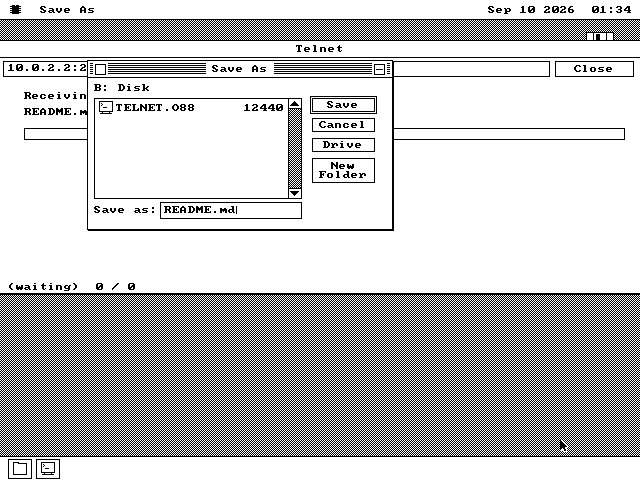
Taking a file off a board
Zmodem, and a checksum decision made by arithmetic.
Pick Receive File from the Session menu and the terminal waits for a transfer. Or let the board start one itself, which is what Zmodem was designed for: the sender announces the file and the receiver notices. This terminal does notice. It reads the name off the wire, puts it in the save dialog, and writes the file to whichever disk and folder you choose.
Zmodem allows two ways to check that the data arrived intact: a sixteen-bit checksum and a thirty-two-bit one. This terminal offers only the sixteen-bit check, and the reason is arithmetic rather than laziness. On a 4.77 MHz 8088 the sixteen-bit check can verify 59,500 bytes a second. The connection under it delivers 3,741. The stronger check would buy nothing that could be used and would cost a kilobyte of the program, on a link that is already checked twice by the network beneath it.
If a board offers the thirty-two-bit form anyway, the terminal says no and the transfer carries on. That is what the negotiation at the start of a Zmodem transfer is for.
Two readers of one specification
How anyone knows the parser is right.
The escape-code parser is written twice: once in 8086 assembly for the machine, and once in Python on the computer the project is developed on. The test feeds both the same stream of bytes and compares all four thousand bytes of the screen, characters and colours alike.
Two independent implementations of one written rule catch what one implementation and its author cannot. A rule that reads one way in the assembly and another way in the document is wrong somewhere, and the comparison says which position on the screen to look at.
Calling something yourself
A network card, a host name and a port.
-
The terminal is on the software disk, in the APPS folder. It needs a network card: tick Ethernet on the Control Panel's Drivers page, or boot a disk whose settings already ask for it.
-
Double-click TELNET.O88. Type a host and a port in the box along the top -- a board's address looks like bbs.example.com:23 -- and press Connect.
-
Ctrl+] gives the session the whole screen, and Ctrl+] again gives it back. The Session menu has the same item, along with the download.
-
The screenshots here are of a test board that runs on the development machine rather than a real one, so that what the pictures show is bytes the project chose. A real board answers exactly the same way.