The graphical desktop the IBM PC/XT never got
A Macintosh System 1-style desktop for the Intel 8086, written in real-mode assembly and booted from a floppy or live USB/CD. Overlapping windows, pull-down menus, a serial mouse, loadable programs, and pre-emptive multitasking -- which the 1984 Macintosh did not have.
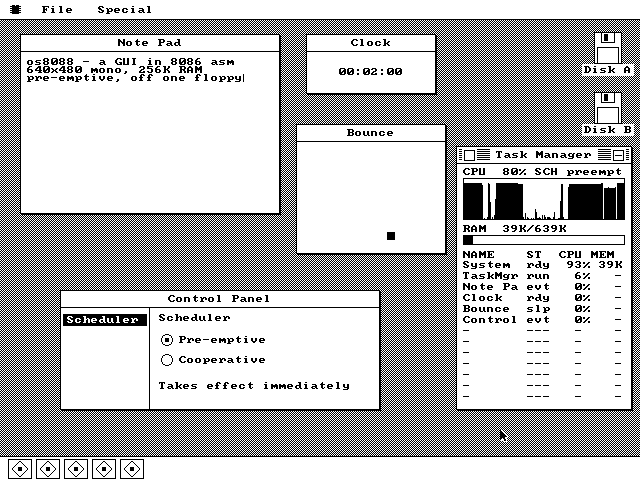
Five programs running at once. A Note Pad loaded off the software floppy, a ticking Clock, a bouncing ball, the Control Panel and the Task Manager, each a separate instance with its own dock tile. The Task Manager reports the machine at 70% busy and 147K of RAM in use.
The desktop at rest, a few seconds after boot. The 512-byte boot sector has loaded the kernel and jumped to it. There is a floppy icon for each drive the machine reports through the BIOS, and the dock is empty because os8088 launches nothing at startup.
A menu is open only while the button is held. Press in the menu bar, drag through the items, release on the one you want. There is no spare copy of the screen to restore from, so the pixels behind the pull-down are copied into a block claimed off the heap for exactly as long as the menu is up.
A title-bar drag, caught halfway through. The window has not moved yet. A hollow one-pixel outline tracks the pointer in XOR mode, so erasing it is the identical operation to drawing it -- you can watch it invert the Disk window's own title text where it crosses.
Several instances of the same program. A Disk window, two Clocks and two Bounces, each a separate record in the instance table, each cascaded sixteen pixels down and right from the previous copy of its kind. Every instance gets a dock tile, and the tile's position is its table slot.
Keystrokes reach the front window only. Two lines typed on the emulated keyboard, wrapped in the window's 258-pixel content area, with the caret after the last character. Each Note Pad instance gets its own 512-character buffer, and as many can be open at once as the heap has room for.
The About box reads live kernel state.
The word pre-emptive on the third line is rendered from the kernel's scheduler
byte every time the box paints, so the About box, the Control Panel and the Task Manager
cannot disagree about which scheduler is running.
The Task Manager, with its history graph filled. One sample every nine ticks into a 160-column ring, so a full sweep across the window is about eighty seconds of history. Apps with no task of their own get their window callbacks timed at the dispatch site and billed to them, so the rows still add up to one total.
The scheduler setting, read straight from the kernel. The settings pane keeps no copy of the scheduler mode: it reads the kernel's mode byte every time it draws. Click Cooperative and the very next timer tick declines to switch tasks, with no restart and no handshake.
Two of these five programs are minimized. Clock and Bounce were sent to the dock with the minimize box in their title bars, and their tiles draw inverted so you can see at a glance what is hidden. Minimized is not stopped -- the Clock is still counting, it only skips drawing.
The file manager, reading the software floppy. The software disk mounted on drive B:, with each file's name, size and its own icon. The icons come off the disk itself -- the browser peeks each file's first sector, where a package carries its own 16x16 bitmap -- so the list shows a real icon without loading it.
Two loaded programs, each in its own segment. MINES and HELLO came off the same floppy into separate regions claimed off the heap -- 2,048 bytes and 512 -- and each runs at offset zero inside its own, so nothing had to be patched on the way in.
Minesweeper: 1,510 bytes, loaded from the floppy. Double-clicking the MINES row read it into a segment of its own and opened its window; from then on its paint, key and click procs are plain near offsets the kernel calls exactly like a built-in's. This board is the only place in the system that uses more than two colors.
ArtfulType, a Markdown writer. ActionRetro's writing app for classic 68k Macintoshes, rebuilt for the 8086. Full-screen Writer mode with its own menu bar, styling as you type, and plain Markdown files that open anywhere else.
Tracker, a four-channel MOD player.
Load an Amiga .MOD off the floppy and play it: the pattern scrolls under the
playing row, four channel meters move with the music, and the desktop stays usable while it
plays.
Paint, a bitmap editor. Pencil, eraser, fill, shapes, selection, eyedropper and text, with a resizable canvas, undo, a clipboard and sixteen colors. Reads and writes BMP and GIF.
Fractal, a Mandelbrot explorer. Zoom in, pick a color scheme, and watch the picture sharpen through three passes. It draws in the background, so the rest of the desktop keeps working while it renders.
Piano, a two-octave keyboard. Play it with the mouse or the computer keys. Notes appear on the staff above as you play, and the staff plays back. Three built-in songs, and FM synthesis on a machine with a sound card.
Recorder, for sampled sound. Record, stop and play, with a waveform display and a built-in demo tone. It uses a Sound Blaster where the machine has one and the PC speaker where it does not; the status line says which.
Solitaire: Klondike. Deal from the stock, drag cards and runs between the seven columns, build the four foundations up from the aces. Cards drag with an outline, the same way windows do.
Arkanoid, a brick-breaker. Move the paddle with the arrow keys, clear six rows of bricks, keep the score across levels. The ball runs on its own timer, so it keeps a steady speed whatever else is happening.
Minesweeper, on a 9x9 board with ten mines.
Click a cell to open it, F for flag mode, N for a new game. Empty
regions open in one click, and the first click is always safe -- the mines are laid after
you have chosen where to start.
Note Pad, a plain text editor. Word wrap, a caret, and Open, Save and Save As through the system file dialog. It writes ordinary files onto the FAT12 floppy, so a note written here opens on a modern computer.
Hello: a window with two lines of text. It does nothing else. It ships as the smallest working example for anyone writing a program of their own, and as the only package with no icon, which is why the Disk window draws it with the generic one.
What it is
os8088 boots from the first sector of a floppy into a graphical desktop. There is no DOS underneath it and no command line anywhere in it -- the 512-byte boot sector loads a 40KB kernel, the kernel works out which display adapter the machine has and switches it into graphics, borrows the video card's own 8x8 character set, and puts up a menu bar.
Everything after that is the interface you remember from a 1984 Macintosh: windows you drag by the title bar with a rubber-band outline, menus you pull down and drag through, a close box and a minimize box, icons for each floppy drive, and a dock along the bottom with one tile per running program. Programs load from a second floppy and run as first-class applications, several at a time.
The whole thing fits in 256K of RAM on an Intel 8086 or 8088 -- the processor in the original IBM PC and PC/XT. It is a hobby project, finished enough to use. The source is real-mode NASM assembly, written with AI, and it is on GitHub.
Video log
os8088 gets recorded as it is built -- one video per step, from the first boot into a desktop to loadable packages. They are all on the video log.
On real hardware
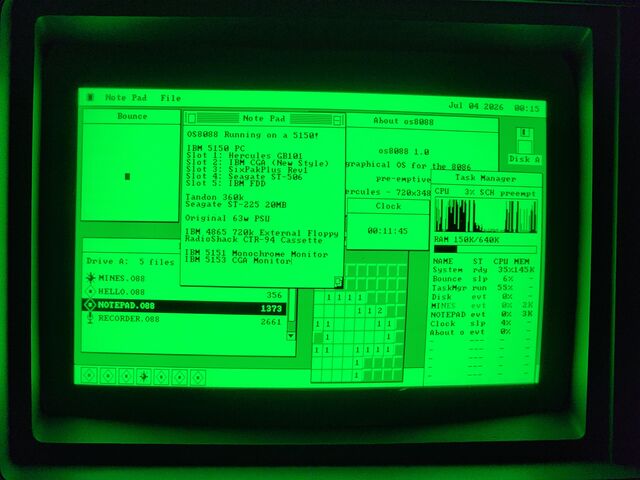
Everything above was captured in an emulator. In August 2026 the disk images were written onto real floppies and booted on three period machines -- a 1981 IBM 5150, a Toshiba T1100 Plus and a 286 -- and photographed.
Try it
The browser demo boots the floppy image in an emulated PC -- the same bytes you would write to a disk. To run it yourself, every release has 360K images for period hardware and 86Box, and 1.44MB images for QEMU -- how to boot them.