Spotlight › WIN16
Windows 3.x programs in an os8088 window
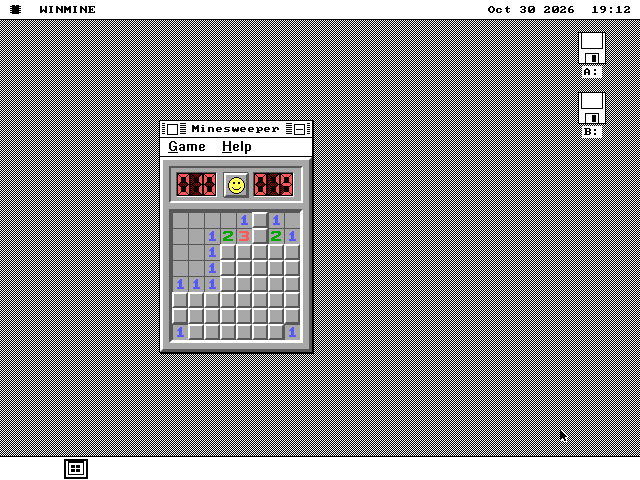
WIN16 runs the original Windows 3.0 and 3.1 program files, such as Minesweeper, Calculator, Clock and Reversi, in os8088 windows on an Intel 8086. There is no copy of Windows on the machine: WIN16 answers each program's calls to Windows itself.
- Windows functions it answers
- 239
- WIN16 on disk
- 66,236 bytes
- Clock opening on a 4.77 MHz 8088
- 22 s
No Windows programs come with os8088. You bring your own, and WIN16 opens them with a double-click.
Windows 3.0 and its programs
What a Windows program is, and why it cannot simply run on another system.
Microsoft released Windows 3.0 in 1990. It ran on top of MS-DOS and gave the PC overlapping windows, menus and a mouse. Windows 3.1 followed in 1992. Minesweeper, Solitaire, Calculator and Clock came with them, so these were the first Windows programs most people used.
Windows 3.0 could still run in real mode, the plain 8086 mode every PC processor starts in. Its programs were 16-bit code for the same processor os8088 runs on. Windows 3.1 dropped real mode and needed at least a 286, but many of its programs still contain nothing a 286 is needed for.
A Windows program file ends in .EXE, like a DOS program. It is a different format inside, called New Executable. The file starts with a small DOS program that only prints "This program requires Microsoft Windows." Behind that is the real program, in several pieces of code and data, with a list of the Windows functions it uses.
That list is why the program cannot just run. It never draws a pixel or reads a key directly. It asks Windows to create a window, draw a line, open a menu or set a timer, by name or by number, in Windows' own modules: KERNEL, USER and GDI. os8088 has none of those. Started on its own, the program would call into nothing.
What WIN16 does
A stand-in for Windows that each program talks to, the idea Wine is built on.
WIN16 is a layer: a program that sits between the Windows program and os8088. It plays the part of Windows. Wine works the same way. It runs Windows programs on Linux and macOS by answering their calls to Windows rather than by running Windows.
There is no processor to emulate here, because the program's code is already 8086 code. WIN16 reads the file's pieces into memory and fixes the addresses inside them for where they landed. It points every Windows function the program names at its own code, then starts the program.
From then on WIN16 answers whatever the program asks. A request for a window gets an os8088 window. A request to draw is drawn with os8088's drawing calls. A click, a key or a timer in os8088 becomes the message the program expects from Windows. It answers 239 Windows functions so far, across seven Windows modules.
A Windows 3.x program shares the processor by giving it up each time it waits for its next message. WIN16 runs it the same way. Each time os8088 hands a Windows program a click, a key or a request to repaint, the program runs until it waits again.
Much of WIN16 was taken from Wine and from winevdm, a related project that runs 16-bit Windows programs on 64-bit Windows. Their tables of Windows functions, their System font and their loader, dialog and control logic were translated into 8086 assembly. That makes WIN16 GPL-2.0-or-later, and its licence travels with it on every disk. The rest of os8088 is unaffected.
See it running
Four Windows programs from 1990 and 1992, on VGA and on CGA.
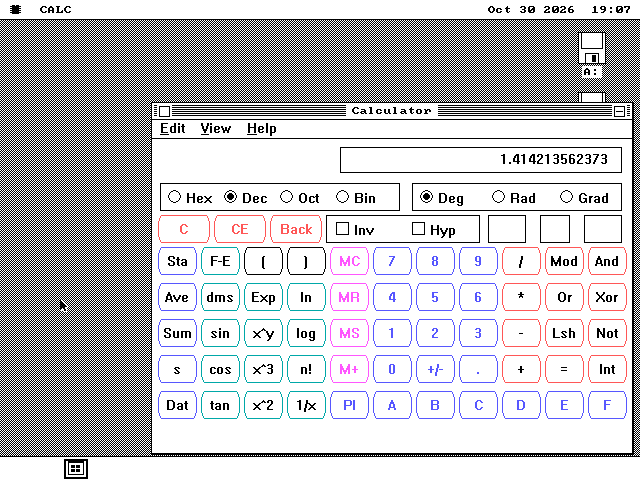
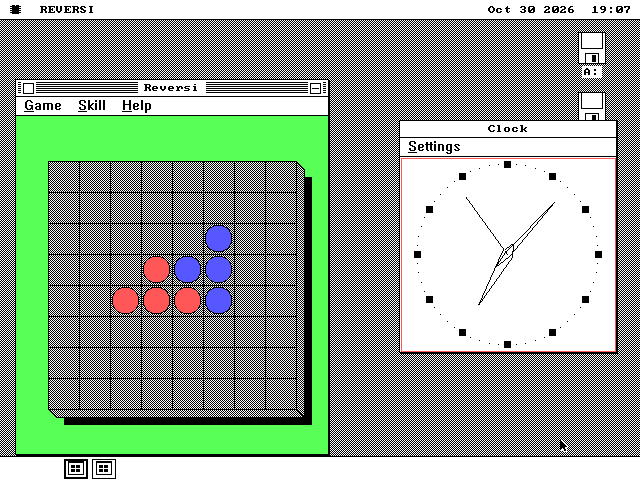
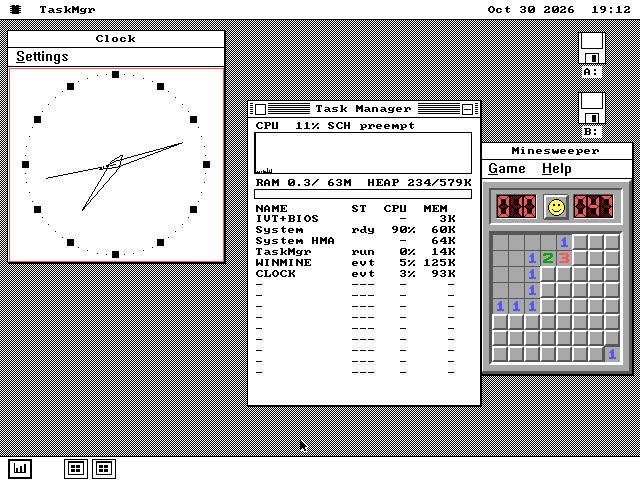
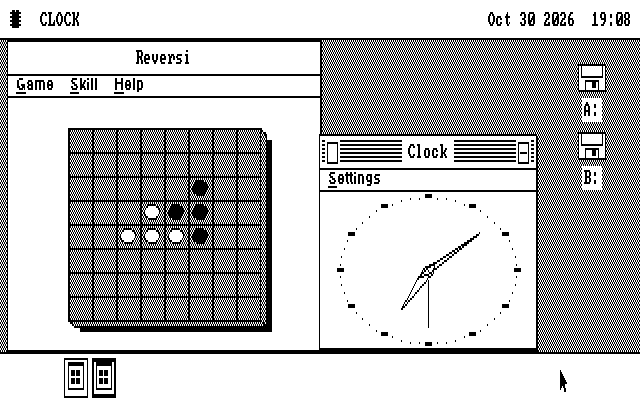
On the os8088 desktop
A Windows program is an os8088 program while it runs.
One window each
Every Windows program is its own copy of WIN16, so two run side by side and neither knows about the other. The Task Manager and the dock show each one by its own name. A Windows program costs from 93 to 133 KB of memory, all of it given back when the program ends.
Windows' look on each card
Windows used a different System font on each graphics card: 16 pixels high on VGA, 12 on EGA and Hercules, and 8 on CGA. WIN16 carries all three, and dialogs are sized from the font as they were on Windows. Menus are drawn inside the program's window, with Windows' check marks.
Settings are kept
Programs keep settings in WIN.INI and in files of their own, such as WINMINE.INI for Minesweeper's best times. WIN16 keeps them in SYSTEM\APPDATA\WIN16 on the disk it started from. Two programs that write the same file both keep what they wrote.
Sound, clipboard, hibernate
Minesweeper's sounds play on the PC speaker. Calculator's Copy and Paste use the os8088 clipboard, which carries text. A machine that hibernates with a Windows program open brings it back where it was.
Which processor runs what
A stock 8088 runs the Windows 3.0 programs. Some later ones need a V20.
Windows 3.0's Calculator, Clock and Reversi use only 8086 instructions, so the original IBM PC's 8088 runs them. On a 4.77 MHz 8088, the time from double-click to a working window is 37.0 seconds for Calculator, 22.2 for Clock and 20.0 for Reversi.
Minesweeper, in Duff Software's 1990 version and in Windows 3.1's, uses instructions added with the 80186 processor. So does Windows 3.1's Calculator. They need a V20, a NEC chip that replaced an 8088 in its socket and runs those instructions, or anything from a 286 up. On a 4.77 MHz V20, Windows 3.1's Minesweeper opens in 25.8 seconds, and a click that uncovers a square takes 1.26 seconds at the median.
An 8088 does not stop at an instruction it does not know. It quietly runs something else. So before a program starts, WIN16 checks every piece of code it can reach for newer instructions. A program the processor cannot run is refused with a message such as "Needs a V20, 80186 or better."
Calculator does its arithmetic with instructions for the 8087, the maths coprocessor an IBM PC could take as an option. Without one, WIN16 carries out those instructions in software, as Windows did.
What it does not do yet
The aim is any Windows 3.x program. These are the parts still missing.
- A program file larger than 64 KB is not opened.
- Programs that need protected mode do not run. That rules out many programs written for Windows 3.1, which had no real mode. WIN16 needs real mode, so it also refuses to start under os8088's own protected-mode kernel for 286 and later machines.
- There are no DLLs, the shared code libraries that larger programs and installers load, whether the program's own or Windows'.
- No printing, no sound beyond the PC speaker, and no linking between programs (DDE and OLE).
- The clipboard carries text only.
- There is no Windows Help. Asking a program for help shows a message box that says so.
- A program that calls a Windows function WIN16 does not have yet is closed, with the name of that function on screen.
A 32-bit program, written for Windows 95 or later, will never run. That is a different kind of program.
Running it yourself
WIN16 is on the software disks. The Windows programs are yours to bring.
-
WIN16 is in a WIN16 folder on the 1.44MB and 1.2MB software disks (apps.img and apps120.img), on the second 720KB software disk (more720.img), on the everything disks and on the live USB image and CD. On the 360KB emulators disk its three files are at the top of the disk. It runs on the standard os8088 kernel, not on the 128KB one.
-
Get the Windows programs from your own copy of Windows 3.0 or 3.1. No Microsoft file is in os8088 or on its disks. Copy the .EXE files onto any floppy os8088 can read. Programs from the Windows directory that work today: CALC.EXE, CLOCK.EXE and REVERSI.EXE from Windows 3.0, and WINMINE.EXE and CALC.EXE from Windows 3.1.
-
Or, on a computer that builds os8088 from source, run
make win16disk WIN3X=<folder>. It writes a floppy in all four sizes with WIN16 and the Windows programs found in that folder, and a PROGRAMS.TXT saying which ones did not go on and why. -
Boot os8088, keep a disk holding WIN16 in a drive, and double-click a Windows program in a Disk window. It opens in a few seconds on a fast PC, and in 20 seconds or more on an XT. Close it with its close box or its own Exit command. If it does not answer, a second click on the close box offers End Task.
-
Keep WIN16.O88, WIN16.TXT and COPYING.W16 together when you copy WIN16 to another disk. The last two are its notes and its licence.
Microsoft and Windows are trademarks of Microsoft Corporation. WIN16 is not Microsoft's and contains none of Microsoft's code.