Spotlight › DOS
DOS programs in a window, several at once
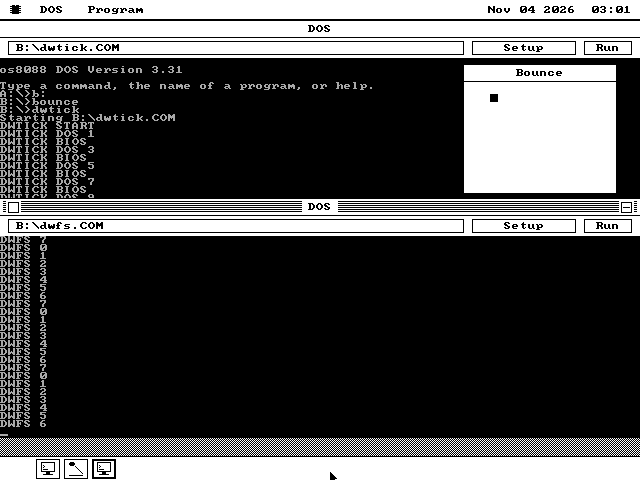
Live DOS windows beside the desktop, on an 8088 with no DOS underneath and no hardware to keep a program in its place.
- Speed in a window, of full screen
- 88.8%
- Memory for each window
- 128 KB
- With os8088 shut down
- 586 KB
What it does
A DOS program sharing a machine it believes it owns.
A DOS program in a window, on an 8088? The processor has no memory protection and no virtual mode. A program can write anywhere in memory, the screen included, and nothing on the chip stops it.
Most programs of the period never need stopping. They print through DOS, or through the video BIOS, the screen routines built into the PC's ROM. os8088 has its own DOS, which answers those calls itself. In a window, their text goes into the window instead of onto the screen.
MS-DOS was the operating system almost every IBM PC ran in the 1980s. A program asks it for a key, a file or some memory through interrupt 21h, a software call to the operating system. os8088's DOS answers the same calls, and reports itself as DOS 3.30. The program cannot tell the difference.
Each DOS window keeps its own set of the addresses a program uses to reach DOS, the BIOS, the timer and the keyboard. os8088 puts that set in place when the program's turn comes and takes it away when the turn ends, so a program sees only its own. That exchange is most of what running in a window costs.
IBM's TopView and Quarterdeck's DESQview ran DOS programs side by side on the same processor in the 1980s. os8088 does it from a graphical desktop, and the DOS programs share the machine with its own programs.
See it
The setting that puts a program in its window, and the ways to start one.
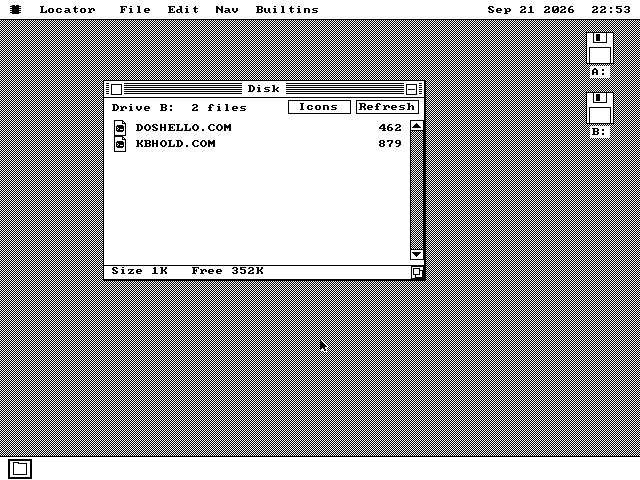
.COM and .EXE gets an icon built from DOS's own. A double-click runs it on the whole screen.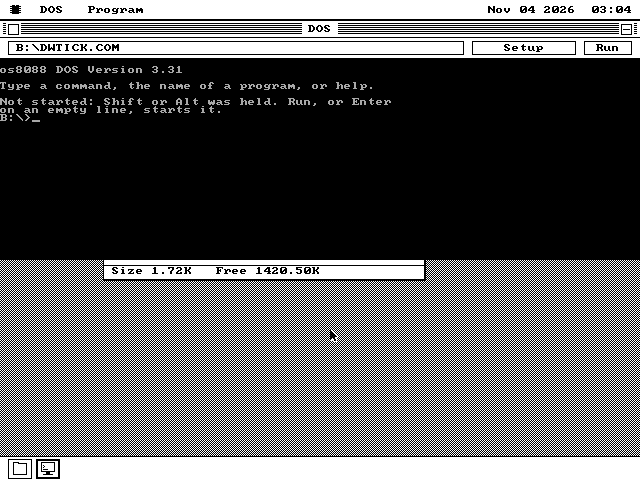
What works in a window
Text programs run live; the rest have somewhere to go.
Several at once
Each DOS window is a separate copy of DOS, with its own program, its own memory and its own keys. Two DOS windows run two programs while the rest of the desktop keeps going. A program waiting for a key gives its time to the others.
Alt+Enter and graphics
Alt+Enter takes a running program to the whole screen without stopping it. Alt+Enter again brings it back to its window, paused on its last screen, and a third resumes it on the whole screen. A program that switches to a graphics mode moves to the whole screen by itself, before it draws anything, and stays there.
The mouse
A DOS program that reads the mouse gets it in its window. The window is its 80-by-25 screen, and a click counts only when the window is already in front. The click that brings a window forward belongs to the desktop.
Programs that write the screen themselves
A program written for TopView asks where to write, and is told the window. WordPerfect 4.1 is one. A program that writes the screen without asking can be caught on a PC with a second display card, whose memory the desktop is not using. Microsoft Works 1.05 runs in a window on a PC with both a Hercules and a CGA card.
Closing a window
Closing a DOS window stops its program through DOS's own exit, so its files are closed. A note left sounding on the PC speaker is turned off, and the timer and interrupt settings the program changed are put back.
Shortcuts with no window
A shortcut saved with Close when done ticked runs its program on the whole screen with no DOS window behind it, only a one-line status while it loads. Leaving the window out gives the program 20 KB more memory. A refusal or a non-zero exit code ends in a short notice on the desktop; a clean exit says nothing.
Three ways to run
A window, the whole screen, or the whole machine.
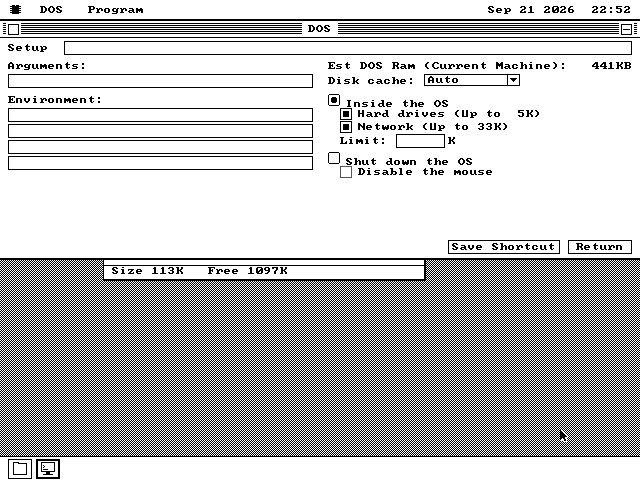
Run in Window keeps the program on the desktop. It gets a fixed amount of memory rather than the machine, so a second window has room to run. A program too large for that reads its own header: WordPerfect 4.1 gets 144 KB, its requirement rounded up to the next 16 KB. A figure typed in the Limit field always wins.
Run, with the setting cleared, gives the program the screen. The desktop waits until it exits, then resumes. This is the default, and it is how a double-clicked program starts. On a 640 KB IBM 5150 with the 360 KB system disk, a program gets 437 KB this way.
Shut down the OS unloads os8088 and leaves only a disk reader and the code that answers DOS calls. On a machine with a hard disk, the session is saved there first and comes back when the program exits. On a floppy-only machine DOS asks before it goes, because every open window is lost and the machine restarts.
A program that does not fit reports Program too big to fit in memory, as DOS did. In a window, the message suggests raising the Limit instead.
What ran
Twelve of fifteen on the whole screen, and three in a window.
Fifteen real DOS programs were tested on an emulated 8088, a simulated processor running at 4.77 MHz, with VGA graphics. Twelve ran. Aldo, Joust, Rockford, Number Munchers, Star Trek and Boloball ran on the whole screen with os8088 still loaded.
Six needed Shut down the OS for more memory. Commander Keen 2 reached the title level. Tom & Jerry reached level select. Chip 'n Dale reached the high-score table. Battle Chess reached the title screen. Test Drive reached the adapter menu. Test Drive III ran through the intro. These results do not establish that every part of each game works.
The other three did not produce a running result. One required a .BAT batch file, a file containing a sequence of commands, which DOS cannot interpret. Another was slow while unpacking 316 KB of compressed data on the 4.77 MHz machine. The last was not reached because of a limit in the automated test setup.
In a window, on an emulated IBM PC with Hercules graphics, a monochrome card from 1982: WordPerfect 4.1 edits, with a typed letter on the screen 0.20 to 0.35 seconds after the key, against 0.12 to 0.23 on the whole screen. Galaxy Trek, a compiled BASIC game from 1983, plays. Microsoft Works 1.05 runs on the same PC with a CGA card added.
WordPerfect and Galaxy Trek both use DOS 1's file calls, which name a file through a block in the program's own memory, the file control block. os8088's DOS answers that family of calls as well as the newer ones.
A command interpreter with no file behind it
How an installer can copy files through a command interpreter that is not on disk.
COMMAND.COM is the DOS command interpreter, the program that carries out typed commands. DOS programs also ask it to perform jobs such as copying or deleting files. os8088's DOS recognises requests to run this name. It carries out the requested command and returns to the program. There is no COMMAND.COM file on disk and nothing is loaded.
The supported commands are COPY, XCOPY, MOVE, DEL (ERASE), REN (RENAME), MD (MKDIR), RD (RMDIR), CD (CHDIR), TYPE, VER, ECHO and REM. The same commands, and DIR, work at the prompt, where they never leave the window.
Prince of Persia's hard-disk installer asks COMMAND.COM to copy its files. The installer runs to completion. It leaves all 28 game files with sizes matching exactly to the byte. It also deletes itself as intended.
What it does not do
A window helps a program that prints. It does nothing for one that draws.
- On a PC with one display card, a program that writes the screen memory itself without asking shows nothing in its window. On a CGA desktop it draws over the desktop. Run it on the whole screen.
- A program in a graphics mode has no text to show in a window. Once it moves to the whole screen it stays there until it exits.
- Every window takes its program's memory for as long as the program runs. How many fit at once depends on the machine's memory and on what else is open.
- Two programs that play music at the same time share the PC's one timer, and the first to finish can upset the other's notes.
- There is no interpreter for
.BATbatch files. - DOS is not on the 128 KB build of os8088.
- This is a DOS for DOS programs, not a copy of MS-DOS. A call it does not implement is refused rather than answered wrongly.
If your program is a game that draws its own screen, the window adds nothing to what the whole screen already gave it. If it is a text-mode program, it now runs beside everything else.
Try it
DOS ships in APPS on all four system floppy sizes, and on the live USB image and live CD.
-
Boot os8088 from the system disk. Put a floppy holding DOS programs in the second drive.
-
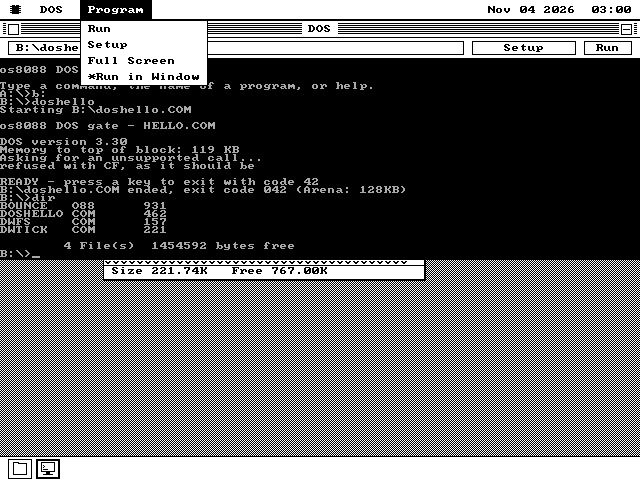
Open the APPS folder on the system disk and double-click DOS. Choose Program > Run in Window; the item is marked with a star while it is on.
-
Type
B:and press Enter, then type a program's name. It runs in the window, and the prompt returns there when it ends. -
Open DOS a second time and do the same, to run two programs at once. Press Alt+Enter to take a running program to the whole screen.
-
To start a program from a Disk window in its window, hold Alt while you double-click it, or Shift while you press Enter on it. Tick the setting, then press Run. Save Shortcut on the Setup page keeps the choice for next time.