Spotlight › MIDIRack
MIDIRack, a MIDI player for whatever sound hardware the PC has
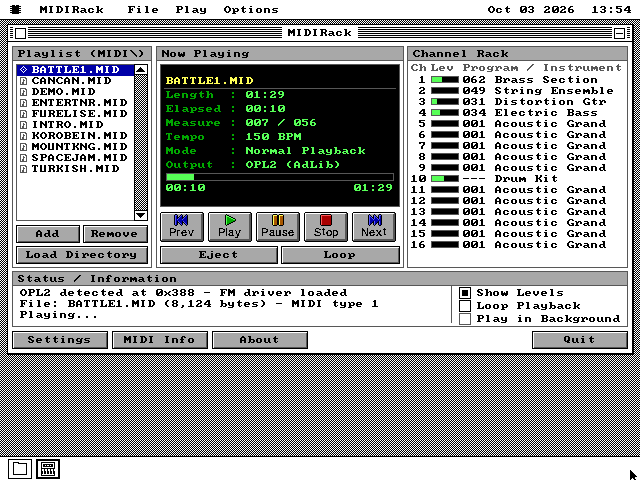
MIDIRack plays MIDI music files through an FM sound card, a Sound Blaster, an external sound module or the PC speaker, and shows every one of a song's sixteen channels as it plays. On a 4.77 MHz IBM PC with an AdLib card, the playing costs the computer almost nothing.
- ways to play
- 6
- channels shown
- 16
- size
- one 28.8KB file
What a MIDI file is
Sheet music for a computer, which is why the same file sounds different on every machine.
MIDI was agreed by the makers of electronic instruments in 1983 so that a keyboard from one company could play a synthesizer from another. It sends instructions, not sound: start this note on this channel, this loud; stop it; change channel 3 to a trumpet. A MIDI file is those instructions saved with the time each one happens. There are sixteen channels, and each one plays one instrument at a time.
That makes the files small. A minute and a half of music with drums, bass, guitar, strings and brass fits in 8KB, where a recording of it would take megabytes. That is one reason so much PC game music of the late 1980s and the 1990s was written this way. In 1991 the General MIDI standard gave the 128 instruments fixed numbers, so a song written for a piano on program 1 got a piano everywhere.
What it does not fix is what the piano sounds like. That is up to the hardware playing the file. The FM chip on an AdLib or a Sound Blaster builds each instrument out of a few sine waves, which is the sound most people remember from DOS games. A sound module such as Roland's Sound Canvas plays recordings of real instruments instead. MIDIRack plays through whichever of these the machine has.
The six ways it plays
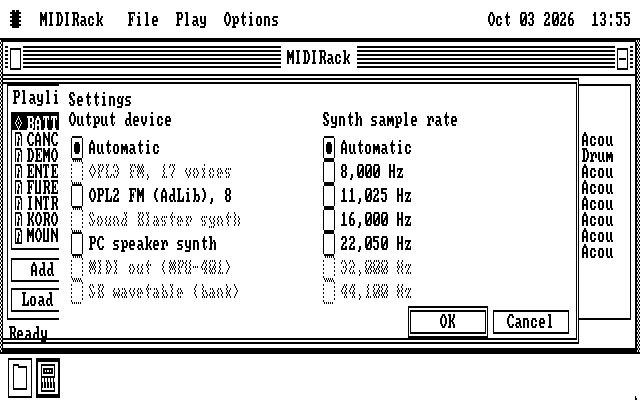
Automatic picks one, and Settings can pick any of the others the machine has.
The FM chip
An AdLib card, or the same chip on any Sound Blaster, plays 8 notes at once. The OPL3 chip on a Sound Blaster Pro 2 or Sound Blaster 16 plays 17, placed left, right or centre. The chip makes the sound itself, so the computer only has to tell it which notes to play. Automatic picks this first.
A synthesizer on the Sound Blaster
MIDIRack works out the sound itself, from simple pulse waves and noise for the drums, and streams it to the card half a second ahead. On a 4.77 MHz PC that is 6 notes at once at 8,000 samples a second.
Recorded instruments
A recording of every General MIDI instrument and drum, played at the right pitch and mixed by the computer, then sent to a Sound Blaster. The recordings come from S. Christian Collins's free GeneralUser GS sound bank, reduced to 210KB. This takes the most work, so Automatic never picks it.
MIDI out
An MPU-401 port sends the song to an external sound module, such as a Roland Sound Canvas or MT-32, or to a small board on the sound card that does the same job. The module plays it with its own instruments, and the computer sends three bytes a note.
The PC speaker
The speaker can only switch on and off, so the synthesizer drives it in very fast pulses to make the levels in between. This takes the whole machine, so the desktop waits while it plays: a click or Space pauses it and gives the desktop back.
The speaker, in the background
Tick Play in Background and the speaker plays just the melody, one note at a time, the way PC games of the early 1980s did. The desktop stays free, so you can carry on working while it plays.
See it running
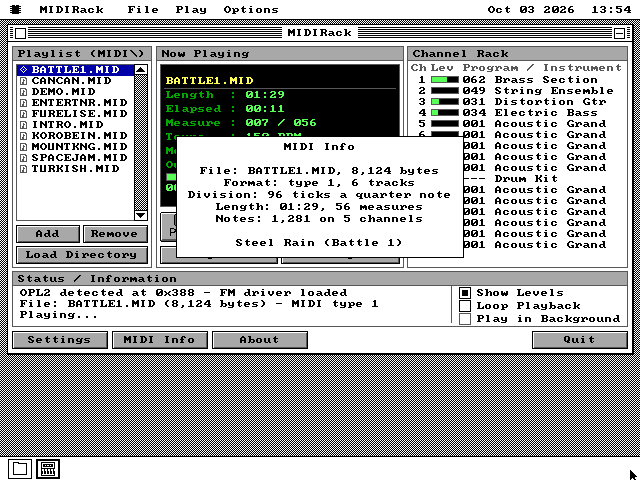
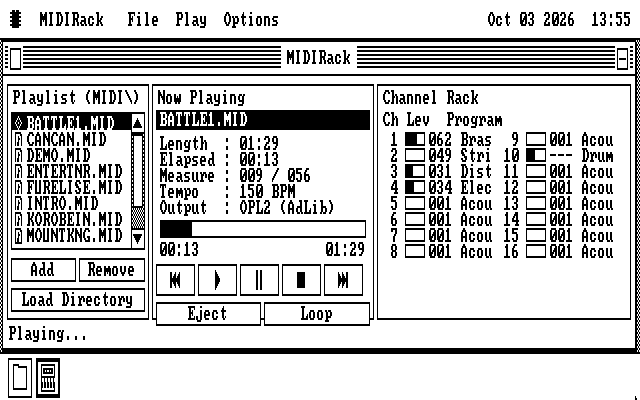
A colour window on VGA, and its own layout on a black-and-white screen.
On a slow machine
What a 4.77 MHz 8088 can afford, measured, and what Automatic picks for it.
Every output except the FM chip and MIDI out makes the sound in software, and software costs time. So when the choice is Automatic, the number of notes and the sample rate are picked from the processor:
| 8088 | 286 | 386 or later | |
|---|---|---|---|
| Synthesizer, Sound Blaster | 6 notes, 8,000 Hz | 8 notes, 16,000 Hz | 8 notes, 22,050 Hz |
| Synthesizer, PC speaker | 4 notes, 5,512 Hz | 6 notes, 16,000 Hz | 6 notes, 16,000 Hz |
| Recorded instruments | 3 notes, 6,000 Hz | 8 notes, 11,025 Hz | 16 notes, 11,025 Hz |
The 8088 figures were measured on an emulated IBM PC that keeps the original's timing to the cycle. At 8,000 Hz it kept up with two recorded instruments, but three reached 94 percent of the rate and four 78 percent, so the sound would break up. Three at 6,000 Hz reach 99 percent. Settings can ask for more on a faster machine.
The window costs as little as it can. While a song plays it redraws about four times a second, and only the numbers and meters that changed, and a level meter that moves redraws only the strip between its old length and its new one.
What it does not do
Left out on purpose.
It plays General MIDI, not the later General MIDI 2. It ignores the messages a file can send to configure one particular synthesizer, and it ignores aftertouch, the pressure on a key after it is struck. On the FM chip it uses two-operator voices only, and not the chip's four-operator voices or its built-in drum mode.
The progress bar shows where the song is, but you cannot drag it to jump to another place.
The recorded instruments are not on every disk. Their sound bank is 210KB, which is too large for The Wire, the library a networked os8088 machine downloads programs from, to send.
Running it
On the software disk already, with ten songs beside it.
-
MIDIRack is on the 1.44MB and 1.2MB software disks, with all ten songs. The 720KB software disk carries it with two of the songs. On a 360KB machine it is on the music disk, media360.img. The Wire installs it with its ten songs too, under Media.
-
For the recorded instruments, take midirack.img from the release zip instead, in the size your machine uses. It is MIDIRack with the songs and the sound bank. The everything disks and the live USB image and CD carry the sound bank as well.
-
Boot os8088 with the disk in the second drive, double-click Disk B, and double-click MIDIRACK.O88. It opens with the songs listed and the first one loaded. A MIDI file anywhere else opens with Add or Load Directory, or from the file manager.
-
Press Play. Settings chooses the output and the sample rate, MIDI Info describes the song, and Loop plays the same song again when it ends. Without it, MIDIRack goes on to the next song and stops at the end of the list. An MPU-401 with no FM chip beside it is not found at startup; turn on the sound driver once in Control Panel, Drivers.