Spotlight › CD-ROM
CD-ROM drives on os8088, and CDRack, a CD player
A data CD in an IDE CD-ROM drive opens on the desktop as a drive you can browse, copy from and run programs off. An audio CD plays through the drive itself under CDRack, a player made to look like a 1980s hi-fi rack unit, so the music costs the computer almost nothing.
- CPU while a CD plays
- a status check every half second
- added to the kernel
- 122 bytes
- CDRack's faces
- 3 layouts, 2 themes
What a CD-ROM drive is
One kind of disc for music and another for files, read by the same drive.
The compact disc arrived in 1982 as a music format. An audio CD holds tracks of sound, and a CD player turns them into sound itself. A CD-ROM is the same disc carrying files instead, about 650MB of them. That was more than four hundred 1.44MB floppy disks, which is why software, encyclopedias and games moved to CD in the 1990s.
The files on a data CD are laid out by ISO 9660, the standard file system for CDs since 1988. It is not the FAT file system DOS uses on floppies and hard disks. Its sectors are 2,048 bytes rather than 512, and its file names can be longer than the eight characters, a dot and three characters that DOS allows. Those are called 8.3 names, and they are what os8088 uses too.
From the mid-1990s most CD-ROM drives plugged into the same IDE connector as a hard disk and talked ATAPI. ATAPI is the set of commands a CD-ROM drive understands over that cable: the computer sends a 12-byte command, such as "read these sectors" or "play from this minute and second", and reads the answer back. The same drive reads both kinds of disc. For music it has a headphone socket on the front and a thin cable at the back to the sound card, and it plays the track out of those by itself.
os8088 now does both. A driver, CDROM.DRV, finds the drive and reads data discs. A program, CDRack, plays audio CDs through it.
Data discs
The CD is a drive on the desktop, and it works the way a floppy does except that it cannot be written.
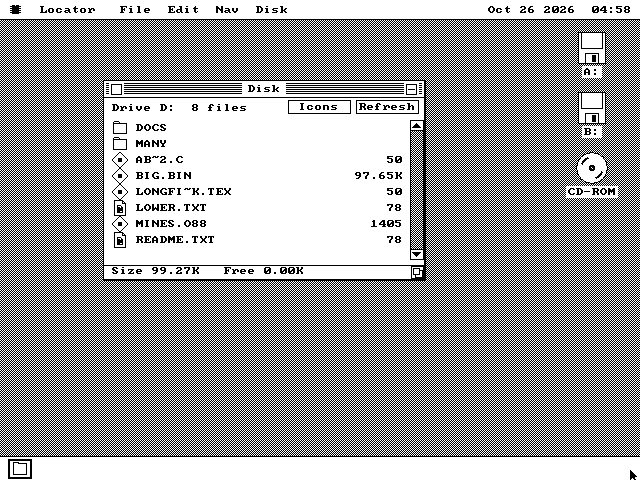
Long File Name.text is LONGFI~K.TEX and A.B.C is AB~2.C. Free space is zero, because a CD is read-only. This is a test disc made for the driver, on QEMU.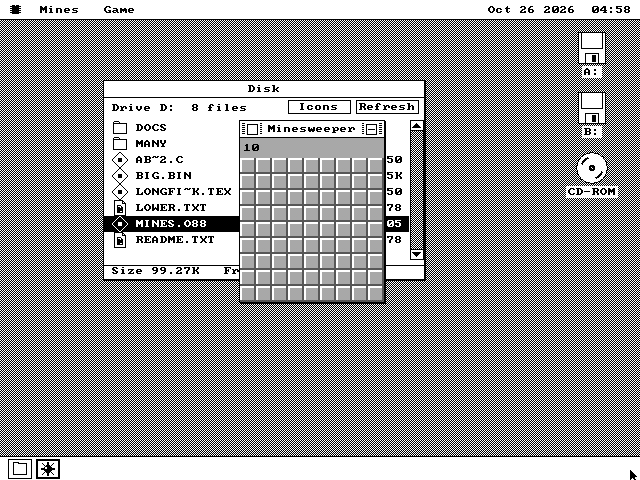
Everything that works on a floppy works on the CD, except changing it. Folders open and .. goes back up. Programs start from it. Files copy off it byte for byte, including ones larger than 64KB. Saving to it, deleting from it or renaming on it is refused as write-protected, the answer a floppy with its tab open gives.
Long names are shortened the same way every time, so a name you saw in a listing still finds the same file later. A name that already fits 8.3 is kept, in capitals. A longer one becomes its first six usable characters, a ~, one letter or digit worked out from the whole name, and the first three letters of its extension.
Take the disc out and put another in, and the driver notices. A window still open on the old disc refuses its next step rather than show the new disc's files under the old disc's names. Opening the drive again shows the new disc. With no disc in the drive, the icon stays on the desktop and opening it does nothing, the way an empty floppy drive behaves.
Audio, and CDRack
The drive plays the music. The computer only tells it what to play and asks where it is.
An audio CD's music is 44,100 stereo samples a second, or 176,400 bytes every second. The computer does not have to move any of it. The drive turns the track into sound itself, as a CD player does, and sends it out of its headphone socket and its cable to the sound card. The computer sends one command to start a track, and while it plays, CDRack asks the drive where it is about twice a second to update the display. That is all the work the computer does for the music.
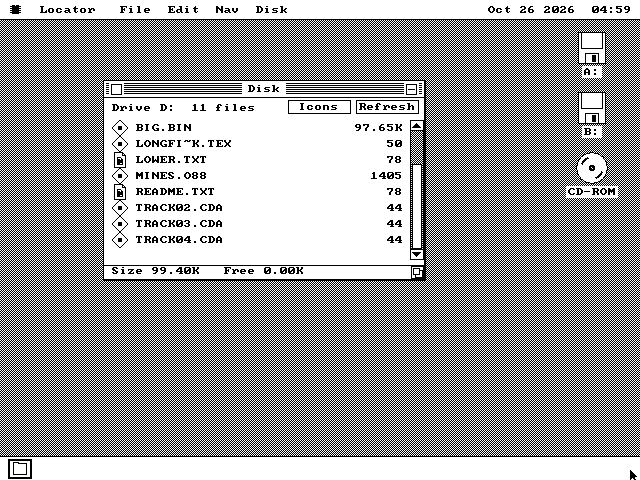
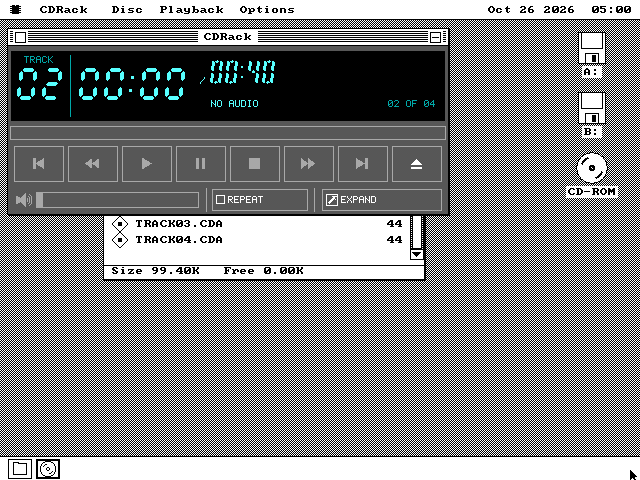
The root of an audio disc lists each track as a file: TRACK01.CDA, TRACK02.CDA and so on. Each is 44 bytes, laid out the way Windows lays them out, holding the track's number, where it starts and how long it is. Double-clicking one opens CDRack on that track.
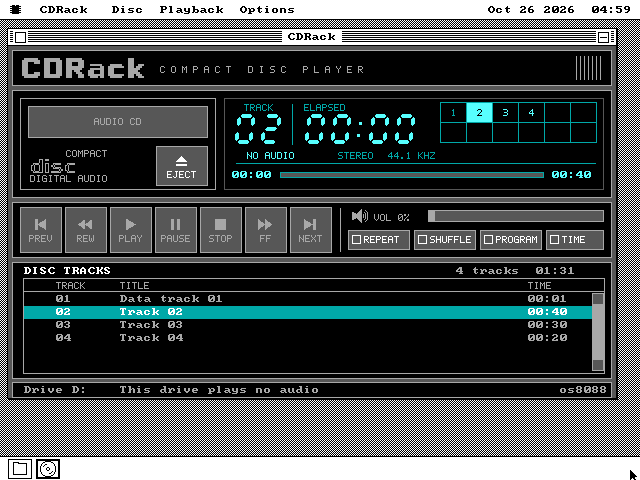
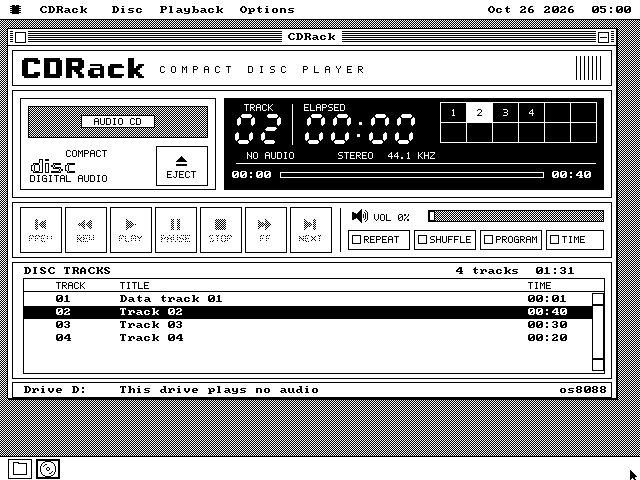
CDRack's look comes from three mockups drawn by the project's author: a colour rack player, the same player in black and white, and a small mini player. It has a seven-segment LCD with a grid of track numbers, picture buttons, a volume slider and a list of the disc's tracks.
Play, skip and seek
Play, Pause, Stop, Previous and Next, plus Rewind and Fast Forward, which move 10 seconds within the track. Previous goes back to the start of the track once it is more than 3 seconds in. A click on the progress bar jumps there, and clicking a track in the grid or the list plays it.
Repeat, Shuffle and Program
Repeat starts the disc again at the end. Shuffle plays the tracks in a random order without playing one twice. With Program on, clicking tracks picks which ones play, marked yellow in the colour grid. Time switches the LCD between time played and time left.
Volume and eject
The slider sets the drive's own output volume, the level of what comes out of its socket and cable. Eject opens the tray and Close Tray shuts it. A drive that does not let its volume be set has the slider greyed.
Keys
Space plays and pauses, S stops, the arrow keys go to the previous or next track, and the comma and period keys rewind and fast forward. Plus and minus set the volume and E ejects. R, H, P and T switch Repeat, Shuffle, Program and Time, and C switches to the compact player.
See CDRack
A colour face, a black-and-white one, and a mini player, all on QEMU.
QEMU, the emulator these pictures come from, has a CD-ROM drive that holds one data track and cannot play audio. So these pictures use a test build of the driver that adds three simulated audio tracks, of 40, 30 and 20 seconds, after the data track. That build is never shipped. CDRack reads the tracks, then says the drive plays no audio and greys every button that would play. Actual playing was checked on 86Box, an emulator of period PCs whose CD-ROM drive does play audio, on an emulated 386. During development the driver played a test disc there on an emulated 386, track 2 into track 3 and on to the end, and the project's author watched CDRack play it through.
How it works
What the kernel learned, what the driver does, and how CDRack keeps its drawing cheap.
The kernel learns almost nothing
os8088 already let a driver answer questions about files itself: list this folder, read these bytes. The RAM disk and the parallel-port cable work that way. The CD-ROM driver is a third, so the kernel never reads a CD sector or learns ISO 9660. The Disk window, copying, the file dialogs and starting programs work on a CD unchanged. The kernel grew by 122 bytes on every machine, with a drive or without: 76 to know the driver, and 46 so that a driver can draw its own desktop icon, here a disc.
A driver loaded only when asked
CDROM.DRV is 5,381 bytes on the system disk and takes 9KB of memory while it is loaded. It is off until you tick it. It looks for a CD-ROM drive on the four usual IDE connections and uses the first one it finds. Every wait is timed by the clock rather than a count, because a CD can take a second to seek and several to spin up.
Three layouts, picked by screen size
CDRack takes the largest layout the window fits. VGA gets the full player, 608 by 352 pixels. EGA and Hercules have about 350 lines, so they get the same player without the track list. A CGA card's 200 lines get the mini player. Colour is the default on EGA and VGA.
Drawn only when it changes
The full player has 32 parts that can change, such as the time, each grid cell and each list row. Each remembers what it last showed and redraws only when that changes. Each is composed off screen and put down in one operation, so no pixel is drawn twice. The digits, letters, buttons and logo are 92 pictures made by a program on the build machine, not drawn by hand.
What it does not do
Left out on purpose, or left for later.
It needs a 286 or later. The drive moves its data 16 bits at a time and an IBM PC or XT's slots carry 8, so half of every transfer would be lost. That is also why the driver and CDRack are not on the 360KB system disk, which is the XT's. Drives on an XT-IDE adapter, and the older drives that plugged into their own cards or a Sound Blaster, such as Mitsumi's, Sony's and Panasonic's, are not supported.
It uses one drive, the first it finds. It shows 8.3 names only, and does not read Rock Ridge or Joliet, the two extensions that stored long file names on CDs. A file split into several pieces on the disc is read as far as its first piece.
It does not read the music off the disc as data, so a track cannot be played through a Sound Blaster instead of the drive's own output, or copied off as a sound file. Booting os8088 from a CD is a separate thing: the live CD on the download page works by pretending to be a hard disk.
Running it
A 286 or later with an IDE CD-ROM drive, real or emulated.
-
The driver and CDRack are on the 1.44MB, 1.2MB and 720KB system disks and on the live USB image and CD. CDRack sits in the system disk's SYSTEM folder. Neither is on the 360KB system disk.
-
Boot os8088, open the Control Panel and go to its Drivers page. Tick CD-ROM. The driver loads at once, and the choice is saved for the next boot when you close the Control Panel. A CD-ROM icon appears on the desktop.
-
In QEMU, add a CD to the machine with
-cdrom yourdisc.isobeside the floppy disks. QEMU can show a data disc but cannot play audio. In 86Box, give an AT-class machine an IDE CD-ROM drive and load a disc image into it. Its audio plays. -
Double-click the CD-ROM icon to open the disc. For an audio CD, double-click a TRACK file to open CDRack on that track, and press Play. Closing CDRack does not stop the disc, because the drive plays on by itself. Press Stop first if you want quiet.