Spotlight › Weave and Loom
Write a program on the machine
Every other program on os8088 was written in assembly on a modern computer. Weave is a different way in: describe the window in markup, write the code that runs when a button is pressed, and put formulas in the cells. Loom is the editor that turns those files into a program, on the 8088 itself.
- edit and build on
- a 4.77 MHz 8088
- Pong runs at
- 17.7 frames a second
- smallest machine
- 256KB, one app
What Weave is
Three kinds of file, one finished program.
The shape of it
A Weave program is written the way a web page is written, in three files.
The markup file lists what is in the window: labels, text boxes, buttons, check boxes, a progress meter, a grid of cells, a drawing canvas. It says what goes where and nothing about how any of it works.
The script file holds the code. It is a small JavaScript-like language, and it is only event handlers -- the code that runs when a button is pressed, a box is typed in, or a ball hits a wall. There is no main loop to write.
The formula file, if there is one, fills the grid. It is spreadsheet formulas:
=SUM(B2:B4) and the like.
What you get
One file, ending in .WAB. Double-click it in the file manager and it opens as
a window with a menu bar, exactly like a program written in assembly. It can be closed,
several copies can run at once, and it saves its own state.
The Pong example is 1,008 bytes.
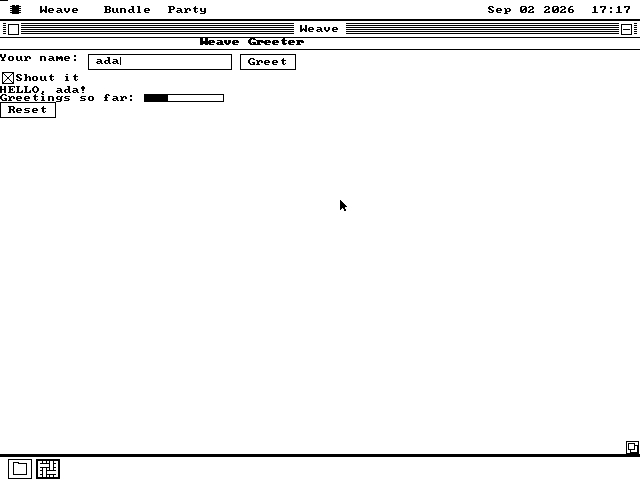
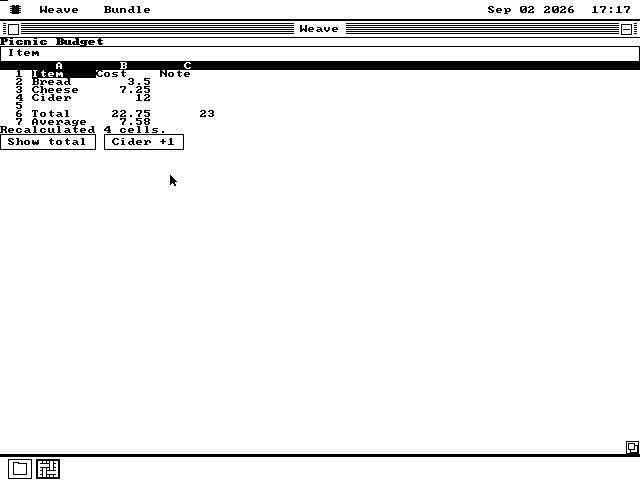
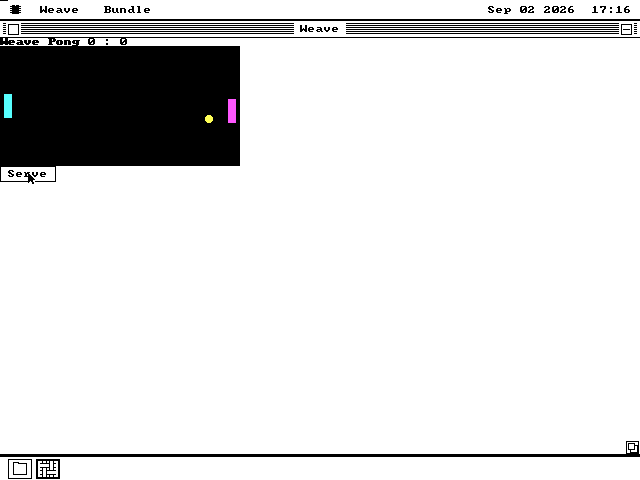
The three example programs
They ship on the Weave disk, with their sources beside them.
Colour, on the canvas only
A drawing canvas and the sprites on it can be given colours, by name, from the sixteen a VGA or EGA card has. Nothing else in a Weave program takes a colour.
That is deliberate. Two of the four graphics cards os8088 runs on are black and white, so anything that told you something with colour would be telling you nothing there. Pong's score is a plain label on every card. On a black-and-white machine the game is drawn with exactly the same instructions as before colour existed.
Loom, the editor
The half that closes the loop.
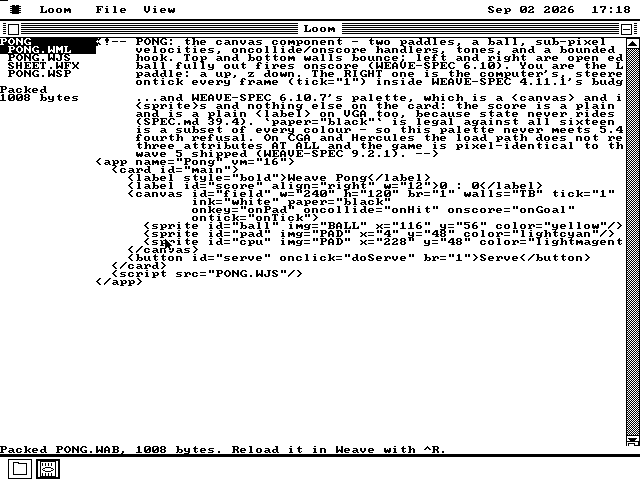
Edit, build, run
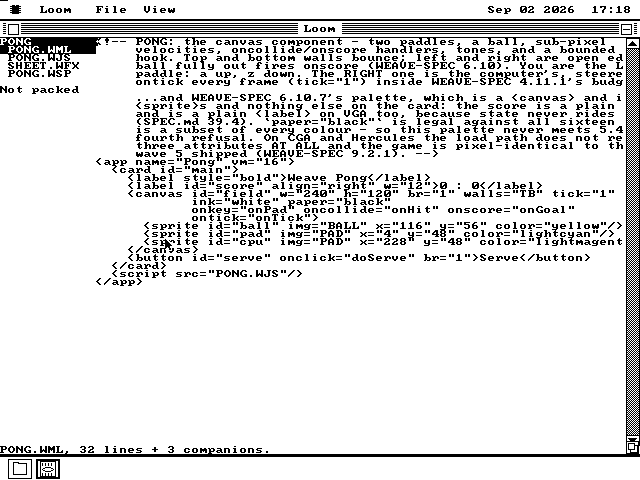
Loom opens a project when you double-click any of its files. The sidebar lists the rest of them; the pane is a text editor. Press Ctrl-P and Loom compiles the markup, the script and the formulas and writes the finished program beside the sources.
If something is wrong, the sidebar says what and the cursor jumps to the line.
The same bytes, either way
The build tools that come with the source code can produce a .WAB on a
modern computer. Loom produces the identical file, byte for byte. That is checked
automatically on every build of os8088, in both directions: the host packs the example
projects and so does the 8088, and the two files are compared.
It matters because it means the machine is not a lesser way to work. A program built on the 8088 is the program, not a draft of it.
How it runs on an 8088
Nothing is read as text while a program runs.
Compiled, not interpreted from source
Reading and understanding markup takes time this processor does not have. So the markup becomes a fixed-size list of what to draw, and the script becomes bytecode. The running program walks the list and runs the bytecode. It never sees a letter of the original.
Script runs in slices
The machine gets through roughly 10,000 to 30,000 bytecode operations a second, which is a few hundred to a few thousand per screen update. A handler that runs long is stopped and resumed rather than allowed to freeze the window, and one that never stops is cut off.
Drawing costs the same as everywhere else
A Weave window draws through the same operating-system calls every other program uses, and only redraws what changed. Pong's running total is about one drawing call a frame on a 1981 IBM PC, and about three on a VGA once the colours are added.
The canvas gets its own task
A program with a drawing canvas runs the animation on a second task, so the game keeps moving while the rest of the window responds. That task exists only while the canvas is running.
What it will not do
The honest list.
It is not a browser. It borrows the shape of markup, script and formulas. It does not accept HTML, CSS or JavaScript, and a page from the web will not run in it.
The script is handlers only. There is no place to put code that runs on its own. Everything happens because something was clicked, typed, timed or collided with.
One program at a time on a small machine. On a 256KB IBM PC, one Weave program fits and a second will not. Asking for one refuses before it touches the disk, and shows the arithmetic on screen. A 640KB machine runs several.
Colour is the canvas and nothing else. Described above.
Run it yourself
Weave and Loom are not on the software disk. They have one of their own.
- Download
os8088.imgandweave.imgfrom the releases page. For 86Box or real hardware take the 360KB pair instead. - Boot
os8088.imgin drive A: withweave.imgin drive B:.qemu-system-i386 -drive file=os8088.img,format=raw,if=floppy -boot a \ -drive file=weave.img,format=raw,if=floppy,index=1 \ -chardev msmouse,id=m0 -serial chardev:m0 - Double-click the drive B: icon, then the
WEAVEfolder, thenPONG.WAB. Press Serve. A is up, Z is down. - To edit it, go back and open the
LOOMfolder instead, and double-clickPONG.WML. Change something and press Ctrl-P.
The two folders each hold a whole working copy, which is why the disk carries the runtime twice. A program built in Loom is written next to its sources, and it has to be able to run where it lands.