Spotlight › Dock
Room to work on a 200-line screen
The dock is the strip of tiles for your open programs. It used to sit along the bottom of the screen, always. Now it can stand on the left or right edge, or hide to a single line. On a CGA screen, that gives a window 23 more rows out of 200.
- rows given back on CGA
- 23 of 200
- files in the same window
- 4, then 6
- edges
- bottom, left, right
What the dock is
And why its size matters more on some screens than others.
Every program you open in os8088 gets a tile in the dock. Click a tile to bring that window to the front. A window you minimize disappears into its tile, and the tile is the way to get it back.
os8088 runs on three kinds of graphics card. A VGA, from 1987, gives it 640 by 480 pixels. A CGA -- IBM's Color Graphics Adapter from 1981, the card in the original IBM PC -- gives it 640 by 200, in black and white. Width is the same on both. Height is not.
The dock is 24 pixels tall. On a VGA that is 5 per cent of the screen. On a CGA it is 12 per cent, and together with the menu bar across the top, 44 of the 200 rows were spoken for before any window opened. Every text editor, file list and spreadsheet on a CGA machine was working in what was left.
Before and after
The same window, zoomed to fill the screen, on the same CGA machine.
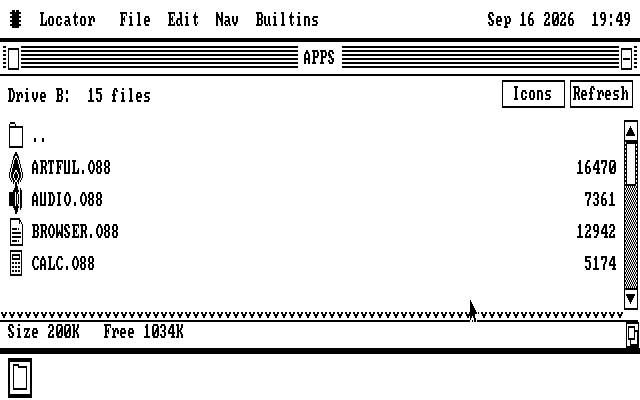
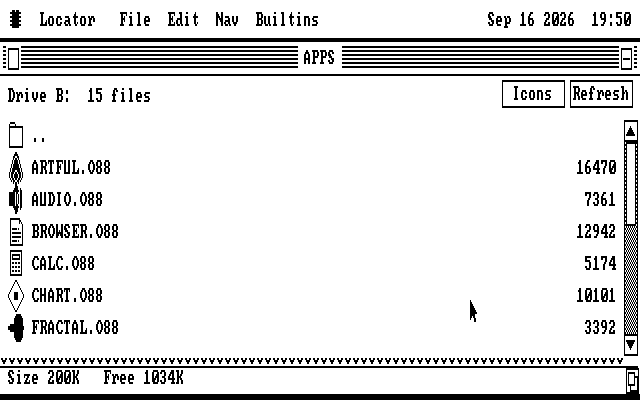
Both pictures come from the same build of os8088, booted in an emulator with its display set to CGA. The only difference is one tick in the Control Panel. Windows are moved to fit the new space as soon as the setting changes, and a zoomed window like this one fills it the next time it is zoomed.
Hiding it
Out of the way until you reach for it.
With Auto-hide ticked, the dock shrinks to a line one pixel thick along its edge. Windows can use everything up to that line.
Rest the pointer on the line for about a quarter of a second and the dock opens on top of whatever is there. Click a tile as usual. Move the pointer away and the dock closes three quarters of a second later; come back within that time and it stays open.
Programs keep running while the dock is open. A clock keeps ticking and a game keeps drawing -- they draw around the open dock rather than waiting for it to close. When it closes, the part of the screen it covered is put back.
On the side
A trade of 32 columns for 24 rows, which suits a wide, short screen.
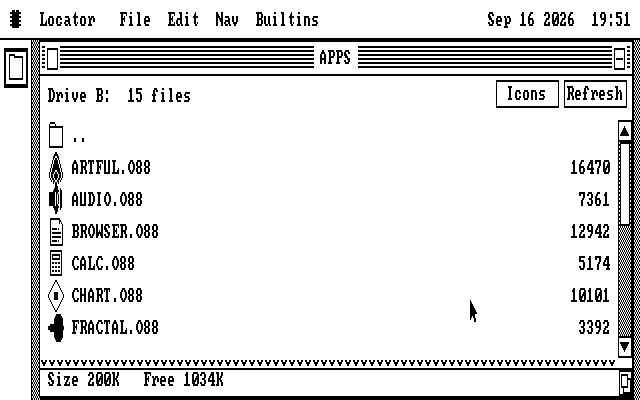
A dock on the left or right edge is 32 pixels wide and always visible. A CGA screen is 640 pixels wide, so that is 5 per cent of the width, where the bottom dock took 12 per cent of the height.
The tiles stack top to bottom instead. A VGA screen has room for all 12. On a CGA there is room for 7, and when more than 7 programs are open, the dock shows the minimized ones first -- an open window can be clicked on the desktop, but a minimized one can only come back from its tile.
Every edge and Auto-hide work on every graphics card, and Auto-hide works on the side edges too.
Try it yourself
Four clicks from the desktop.
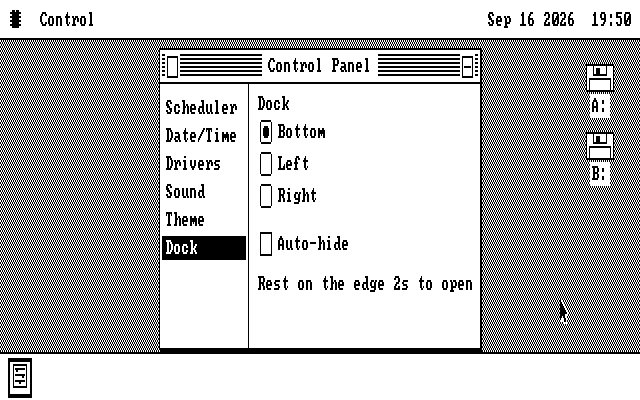
Open the Control Panel. It is in the menu under the chip symbol in the top-left corner of the screen.
Pick Dock in the list down the left side of the window. The list scrolls now, because the Control Panel has more pages than fit in it.
Choose an edge, or tick Auto-hide. The desktop changes as soon as you click. Nothing needs a restart.
Close the Control Panel. The setting is saved to the system disk and used on every start after this one.
To see a CGA screen without a CGA card, build os8088 from source with
make VIDEO=cga, which skips the check for which card is fitted and assumes a CGA.
The source tree also has a ready-made 86Box machine with one: make xt-cga.