Hardware › Book8088
The Book8088
A laptop you can buy today, built around the processor the IBM PC had. os8088 boots it from its CompactFlash card, draws the desktop on its CGA screen -- and drives a USB mouse through the chip behind its USB socket, which is something no machine from the period can offer.
- CPU
- 8088
- screen
- CGA, 640 x 200
- disk
- CompactFlash, as C:
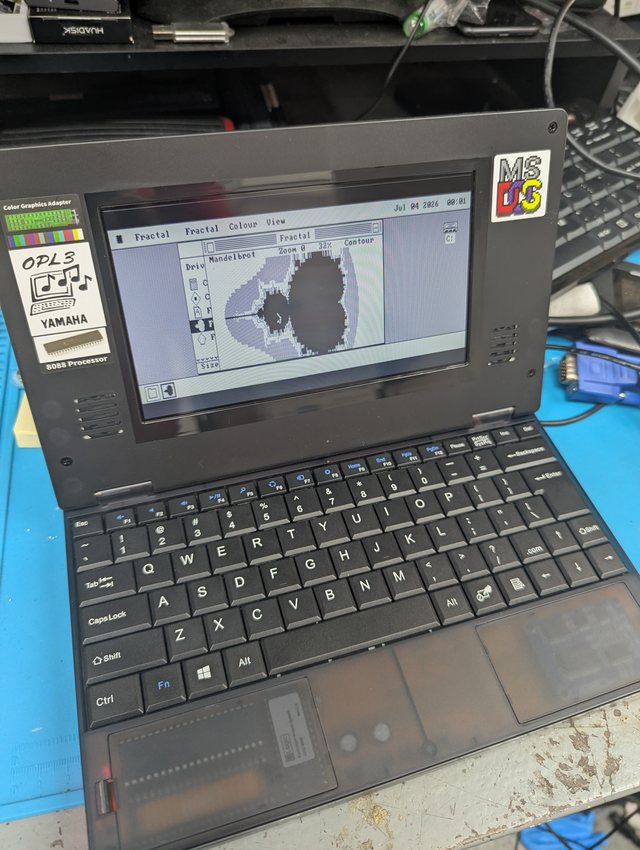
The machine
An 8088 that is still in production.
The Book8088 is a small laptop built around an 8088 -- the processor in the 1981 IBM PC, and the chip os8088 is written for. It has a CGA-compatible LCD, a Yamaha OPL3 for sound, a CompactFlash card where the hard disk would be, a floppy connector, and one USB socket.
That makes it an odd and useful machine for this project. Everything else on the hardware page is period iron that has to be kept alive; this one is new, which means a person who wants to run os8088 on the real instruction set can buy the hardware rather than hunt for it. os8088 asks for an 8086 or 8088, 196KB of RAM and a display adapter, and the Book8088 answers all three.
What it does not have is a serial mouse port or a PS/2 socket, which are the two pointers os8088 knew about. It has a USB socket instead -- so on this machine, a mouse had to come through USB or not at all.
Getting os8088 onto it
The live image, written for the card's own geometry.
The Book8088 boots from its CompactFlash card through the XTIDE Universal BIOS, and that
changes how the card has to be written. A modern PC works a drive's shape out from the
partition table; XTIDE reports the card's own shape instead, so an image written the
ordinary way gives Not bootable on this machine even though it is perfectly
good.
So the image has to be written for the geometry the card reports. os8088's disk imager asks one extra question for a CompactFlash card and rewrites the image to match -- the running it page has the details, and a 256MB card, for example, wants 16 heads and 32 sectors. Once written, the machine comes up with the card as C:, which is the drive icon in the top right of the photo above.
The screen is CGA, so the desktop is 640 by 200 in black and white rather than the 640 by 480 of a VGA. Windows keep their width and lose half their height.
A USB mouse on an 8088
Tick one box, plug a mouse in.
The USB socket is not a USB controller in the modern sense. It is a WCH CH375B: a chip that speaks USB on one side and, on the other, offers an 8-bit computer two I/O ports and a command set. The machine's BIOS uses it to boot from a flash drive. A mouse is a different kind of USB device, and reaching one means speaking the protocol directly -- which a proof of concept did first, moving a text-mode cursor around a DOS screen.
os8088 now ships a driver for it:
- Open the Control Panel from the menu bar and go to its Drivers page.
- Tick USB Mouse. The setting is remembered on the system disk, so the machine comes up with it from then on.
- Plug a mouse into the USB socket. It is picked up when it is plugged in, not only at startup, so it can go in and come out while the machine runs.
It is off until you tick it, like every other driver in os8088. That is deliberate: finding the chip means writing to two I/O ports, and on a machine that is not a Book8088 those ports may belong to somebody else's expansion card. A system that probed them on every start would be poking at a stranger's hardware to ask a question only one machine answers.
An ordinary two-button or three-button mouse is what this expects. The middle button and the scroll wheel are ignored, because os8088 has nothing to do with either.
How the mouse driver works
A driver, a background task, and one new call into the kernel.
USBMOUSE.DRV is a file on the system disk, read only when it is asked for.
When it loads, it checks that the chip is really there, then starts a small background task
that owns the conversation with it: reset the USB bus, ask the device what it is, walk its
descriptors for a mouse, put it into the simple report format every mouse understands, and
then ask it for movement over and over.
Each report is three bytes: the buttons, how far the mouse moved sideways, and how far it moved up or down. The driver halves both distances before handing them over, because a USB mouse counts two to four times finer than the serial mice os8088 was built around -- at full count, a flick of the wrist crossed the screen.
The kernel gained one call for this, and no clock work: nothing in the system checks for a USB mouse. The driver does its own waiting, so a 1981 IBM PC with no such chip pays nothing at all for the feature beyond 193 bytes of kernel it never executes and one file on the floppy it never reads.
Waiting is the part worth describing. The chip has an interrupt line, and even where that line is not wired to anything the processor can see, its state can be read back from one of the two ports. So the driver asks the chip to keep after the mouse by itself and simply watches that bit: while your hand is still, the whole cost of the feature is one port read per timer tick, about eighteen times a second. When a report does arrive the driver speeds up, reading as fast as the mouse will talk for the next half second, so movement is smooth rather than stepped. And if that bit turns out not to reach the bus on some card, the driver notices during setup and falls back to a slower method that needs no interrupt line.
Two things it is careful about
A shared socket, and a button that must not stick.
It will not take a flash drive away from the machine. The Book8088 can boot from a USB stick through that same chip, and resetting the USB bus to look for a mouse would pull the disk out from under a running system. So before touching anything, the driver asks the chip whether some other program has already set up the device on the bus. If it has, the driver reads that device's description without disturbing it, and refuses to load at all unless what it finds is a mouse. The Drivers page then says Busy rather than No hardware found, which is the honest answer: the hardware is there and it is someone else's.
Unplugging the mouse mid-click releases the button. The system only learns a button has come up when a report says so, and a mouse that has been pulled out sends nothing ever again -- so a mouse unplugged with the button held would have left a drag running forever, with a window stuck to the pointer. The driver reports the release itself when the device disappears, and again when you turn the driver off.
What has been run, and what has not
It works on the machine. Not every path has been down.
The mouse works on a Book8088. A stock machine with its factory BIOS, booted from CompactFlash, with an ordinary wired USB mouse in the socket: the pointer tracked, clicks and menus worked, and the halved movement felt right -- which is the one thing no amount of testing away from the machine could have settled.
That matters because of how the driver was built. No emulator os8088 is tested on carries a CH375, so it was written against a model of the chip: a second copy of the driver with a software CH375 and a software mouse underneath it, driven by an automated test on an emulated 8088 that plugs a mouse in, moves it, clicks through a menu, pulls it out mid-click, offers it a flash drive instead, and restarts the machine. Every one of those checks was made to fail on purpose before it was trusted -- but a model written from the same reading of the chip's documentation as the driver cannot tell you the reading was right. The machine can, and did.
What that run did not cover is worth being plain about, because these paths still rest on the model alone: plugging the mouse in and out while the machine runs, the slower fallback for a board whose interrupt bit is not readable, and the refusal that protects a USB boot disk -- there was no flash drive in the socket to refuse. Nor has any mouse other than that one been tried, and a wireless receiver is the device most likely to run into the driver's limits: it reads only the first 64 bytes of a device's description, which is where a combined keyboard-and-mouse dongle can hide its mouse.
If you have a Book8088, or an 8-bit USB card in something else, a report either way is genuinely useful -- open an issue and say what the Drivers page shows.